
Can Your Business Use Stripe for Online Payments?
Last updated on

 Cristian Rossi
You’ve picked Stripe, your WordPress site is almost ready, and the last thing you want is an email from Stripe right after your first sale. For most consultants, coaches, freelancers, and nonprofits, you can use Stripe for online payments without any trouble.
It comes down to three things: where your business is based, what you sell, and what your website shows. Stripe also keeps reviewing accounts after they go live, so approval isn’t a one-time hurdle.
What you sell is where the surprises tend to be, in both directions. Nonprofit fundraising needs an extra review before approval, while telemedicine, vape shops, and travel booking services are restricted rather than banned, so they can often get approved too.
In this article, I’ll show you how to check each of Stripe’s three requirements, what happens if Stripe flags your account, and how to confirm you qualify before you connect Stripe to WordPress.
Which Businesses Can Use Stripe for Online Payments?
Stripe supports a business when it passes three checks.
Your business has to be based in a supported country, it can’t sell anything on Stripe’s prohibited list, and your website has to match what you tell Stripe during signup.
If you sell something on the restricted list, you’re not automatically out. You’ll go through an extra review first, and approval can take longer.
Most service businesses never get near either list. Consultants, coaches, landscapers, photographers, event organizers, and course creators usually only need to worry about the country and website checks.
Check 1: Is Your Country Supported by Stripe?
Stripe’s global availability page lists 51 countries and regions.
44 of them are fully supported, including the United States, Canada, the United Kingdom, Australia, Japan, and most of the European Union.
The other seven work a little differently. India and Indonesia are in preview, so you contact Stripe’s sales team instead of signing up directly.
Businesses in Côte d’Ivoire, Ghana, Kenya, Nigeria, and South Africa are routed to Paystack, which is part of Stripe’s extended network.
Territories catch people out too. A US business has to be located in the 50 states, Washington, D.C., or Puerto Rico, so the US Virgin Islands and other US territories aren’t supported.
That same page excludes British Crown Dependencies like Jersey and the Isle of Man, plus the Dutch Caribbean. On the other hand, some French overseas regions, like Martinique and Réunion, are supported.
What if your country isn’t on the list at all? Stripe Atlas lets you incorporate a US company from abroad for $500, plus $100 a year for the registered agent.
That’s a real commitment, so it’s worth reading whether Stripe Atlas is worth it before you sign up.
Why your country matters inside WordPress too
Your Stripe account’s country also decides which payment methods you can offer your customers.
In WP Simple Pay, you’ll find this under WP Simple Pay » Settings » Stripe » Account, in the Country setting. Its description reads “The country associated with the connected Stripe account.”
When a payment method isn’t offered in that country, the form builder lets you know with a note that it “is not available in your Stripe account’s country.”
So before you promise customers a local payment method like Klarna or iDEAL, it’s a good idea to check it’s available for your country first.
Check 2: Is Your Business Prohibited or Restricted?
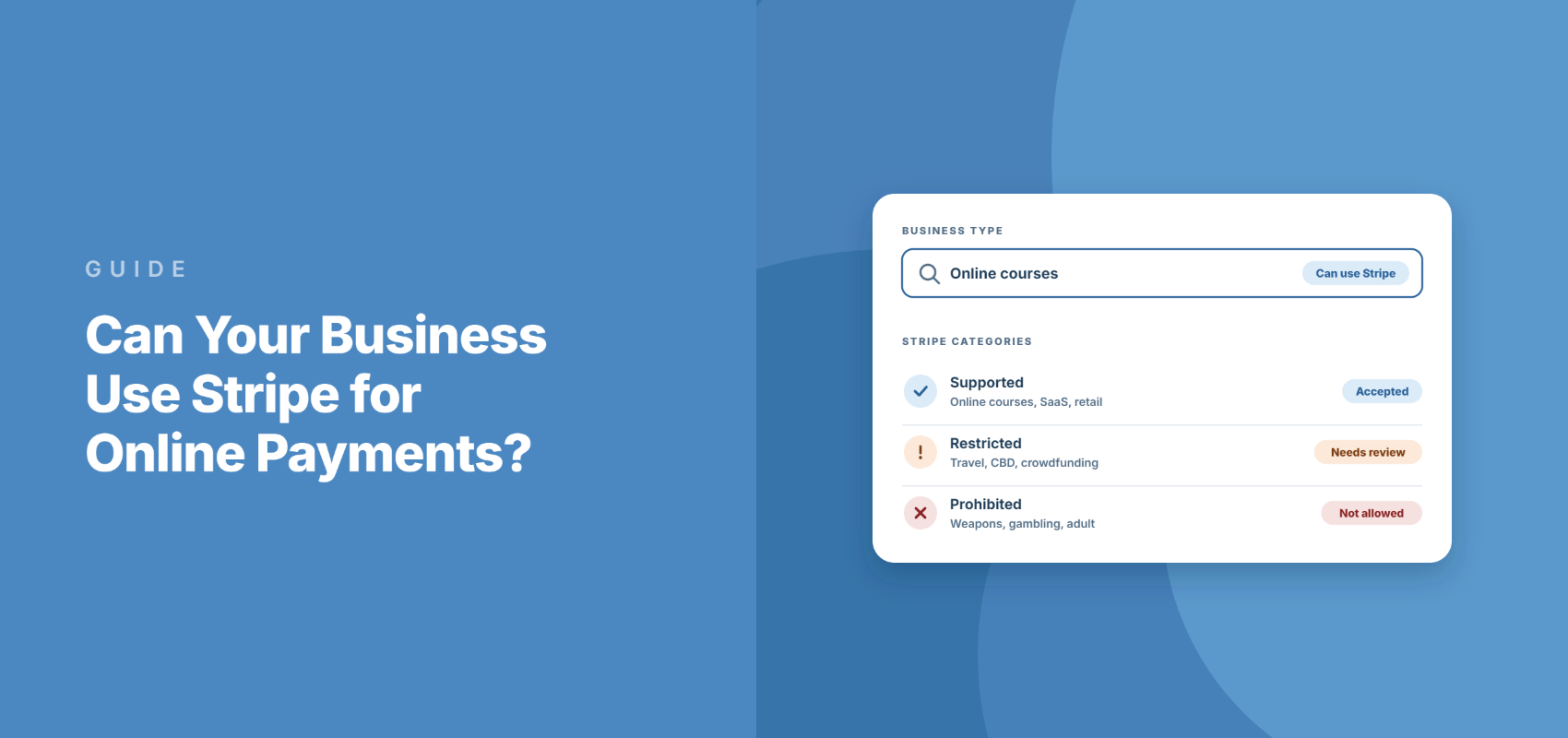
Stripe’s Prohibited and Restricted Businesses page splits businesses into two groups.
Prohibited means Stripe won’t support you. Restricted means Stripe needs “additional due diligence” before it approves you.
Keep in mind that both lists are examples rather than complete rules. Stripe says the categories are “representative of prohibited categories, but this is not an exhaustive list.”
Prohibited businesses
Here are the top-level categories Stripe won’t support, as of its September 22, 2026 update:
- Any illegal products and services
- Adult content and services
- Debt relief companies
- Certain financial products and services, such as check cashing, debt collection, and peer-to-peer money transmission
- Gambling
- Government services
- Identity services
- Illegal weapons, explosives, and dangerous materials
- Products and services that infringe on intellectual property rights
- Certain legal services: bankruptcy attorneys, bail bonds, and law firms collecting funds for anything other than their legal fees
- Lending and credit
- Marijuana
- Nutraceuticals and pseudo-pharmaceuticals that aren’t safe or make harmful claims
- Nonfiat currency
- Certain travel businesses: commercial airlines and cruises, international charter flights, and timeshares
- Unfair, deceptive, or abusive acts or practices
On top of those, Stripe prohibits doing business with high-risk jurisdictions and sanctioned persons.
If you run events, pay close attention to gambling. Stripe’s definition goes beyond casinos to include sweepstakes, contests, and paid-entry competitions that offer a prize of value.
Charity sweepstakes and raffles are a separate case. They sit on the restricted list instead, and only in some countries.
Restricted businesses (approval needed)
These categories can still use Stripe, but only after Stripe reviews them:
- Content creation platforms, such as sites that sell exclusive content or take tips
- Crowdfunding and fundraising, including nonprofit and charity fundraising
- Dating
- Cyberlockers
- Regulated industries: CBD, cryptocurrency, financial products and services, legal firearms, pharmaceuticals and telemedicine, tobacco (including e-cigarettes), stored value, and third-party agents
- Travel reservation services and clubs, as businesses that might carry elevated financial risk
It’s worth knowing that approval for a restricted business covers one offer at a time.
Stripe says it “is specific to each service offer, and it may be modified or revoked by Stripe at any time.” So if you add a new product line later, you might need a new review.
Rules that depend on your country
Some countries add their own rules on top of the main list. Stripe publishes extra prohibited lists for Brazil, Canada, India, Indonesia, Japan, Malaysia, Mexico, Singapore, Thailand, the UAE, and the United States.
For a US business, that extra list currently includes:
- Extended warranties
- Medical benefit packages not offered by a government or health insurance company
- Mortgage consulting
- Shipping brokers and freight forwarders, without prior authorization from Stripe
Telemedicine is a good example of how the two layers work together. It’s restricted in Stripe’s main list, but prohibited outright in Mexico.
What this means for nonprofits
If you collect donations, you fall into the restricted fundraising category.
That usually means a longer review rather than a refusal. So it’s smart to start your Stripe signup well before a campaign launches.
There’s an upside, too. Stripe offers lowered fees for qualifying nonprofits.
To qualify, at least 80% of your Stripe volume has to come from tax-deductible donations. Stripe’s eligibility page says membership fees, tickets, and tuition don’t count toward that.
Check 3: Is Your Website Ready for Stripe’s Review?
During signup, Stripe reviews your website, social media profile, or app.
According to Stripe’s website requirements, it has to show your business name and a description of what you sell. Both must align with the information you’ve provided to Stripe.
The page also has to be “accessible without a password.” If your site is still hidden behind a coming-soon page, that can hold up your approval.
By the time you start selling, Stripe also expects to see:
- Customer service contact details
- A refund and dispute policy
- A return policy, if you sell physical goods
- A cancellation policy, if one applies
- Terms for any promotions you run
Service businesses and nonprofits get a small break here. Stripe’s website checklist says businesses that only offer in-person services or only take charitable donations don’t need fulfillment policies.
A clear refund policy pays off after approval, too, because it helps you head off disputes. This guide on how to avoid payment disputes with a refund policy walks you through writing one.
What Stripe asks for during signup
In the US, Stripe verifies your legal business name and your business type, like sole proprietor or LLC.
It also asks for your EIN, SSN, or ITIN, and a business address that isn’t a PO box. If you’re a sole proprietor without an EIN, you can sign up with your SSN or ITIN instead.
After that, you’ll add the bank account your payouts go to.
Stripe says most approvals are close to instant. Businesses on the restricted list, though, “commonly experience longer processing delays.”
What Happens If Stripe Flags Your Account?
Stripe doesn’t stop checking once you’re approved.
It says an account may be restricted “as the result of legal, regulatory, or financial partner obligations,” and that its review “ultimately determines whether a business is supported.”
That review can lead to any of these:
- A reserve. Stripe holds back part of your balance to cover possible disputes, and you can keep taking payments while it’s in place.
- Paused payouts. Under Stripe’s Unacceptable Risk Policy, Stripe will “typically restrict or pause payouts” for 120 days from the first notice email, then review the account to decide what happens to the remaining balance.
- Account closure. Stripe emails you if it can’t support your business, and the email links to a form you can use to appeal.
The best protection is staying clearly inside the rules from day one. This guide on how to keep your Stripe account in good standing covers the habits that help, like keeping your dispute rate low.
And if Stripe can’t support your business at all, a specialist processor may be the answer. This explainer on high-risk merchant accounts covers when one makes sense.
How to Check If Your Business Can Use Stripe Before You Connect It to WordPress
Here’s the order I’d follow before building a single payment form.
It only takes a few minutes, and it’s a lot less painful than finding out after your first payout is held.
Step 1: Confirm Stripe supports your country
To start, find your country on Stripe’s global availability page.
If you’re in a territory or an extended-network country, take another look at the details in Check 1 before you go any further.
Step 2: Find your business on Stripe’s list
Next, you can open the Prohibited and Restricted Businesses page.
Read it against everything you sell, not only your main service. From there, scroll down to the jurisdiction-specific section and check whether your country adds any extra rules.
Step 3: Ask Stripe first if you’re in a gray area
If anything you sell is close to a restricted category, it’s worth contacting Stripe Support before you build anything.
That’s Stripe’s own advice, too. It asks you to reach out “if you are not sure if your business falls into the categories listed there.”
Step 4: Get your website ready for review
After that, you’ll want to make sure your site is public.
Check that it shows your business name, a description of what you sell, your contact details, and a refund policy. All of it should match what you’ll enter during Stripe signup.
Step 5: Connect Stripe to WordPress and test in Test Mode
Once you’re confident your business qualifies, you can connect Stripe to your site.
In WP Simple Pay, the setup wizard walks you through this right after you activate the plugin. If you skipped the wizard, you can head over to WP Simple Pay » Settings » Stripe » Account instead.
From there, click the Connect with Stripe button and follow Stripe’s prompts to sign in or create your account.
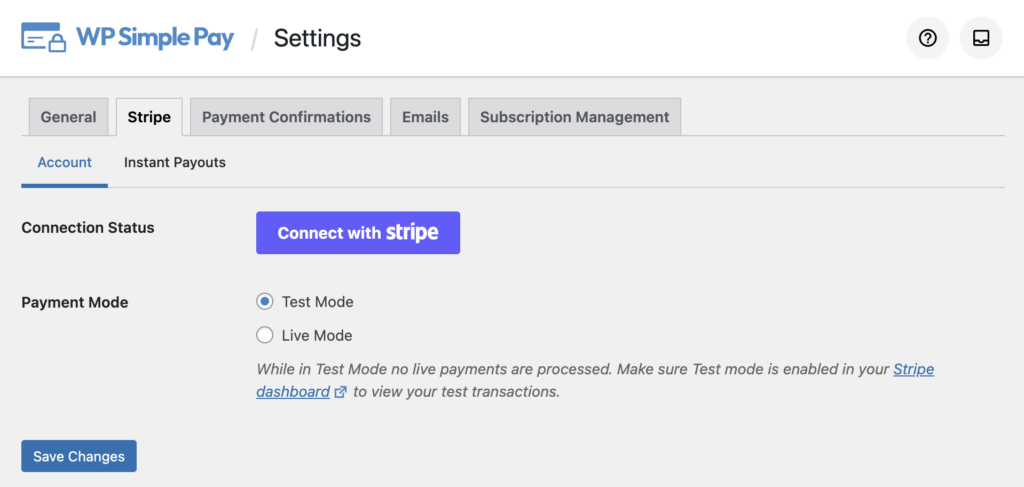
On the same screen, you’ll see the Payment Mode setting. WP Simple Pay starts in Test Mode by default, so no real payments go through while you set things up.
If you’d like a walkthrough, here’s the official guide to using test mode.
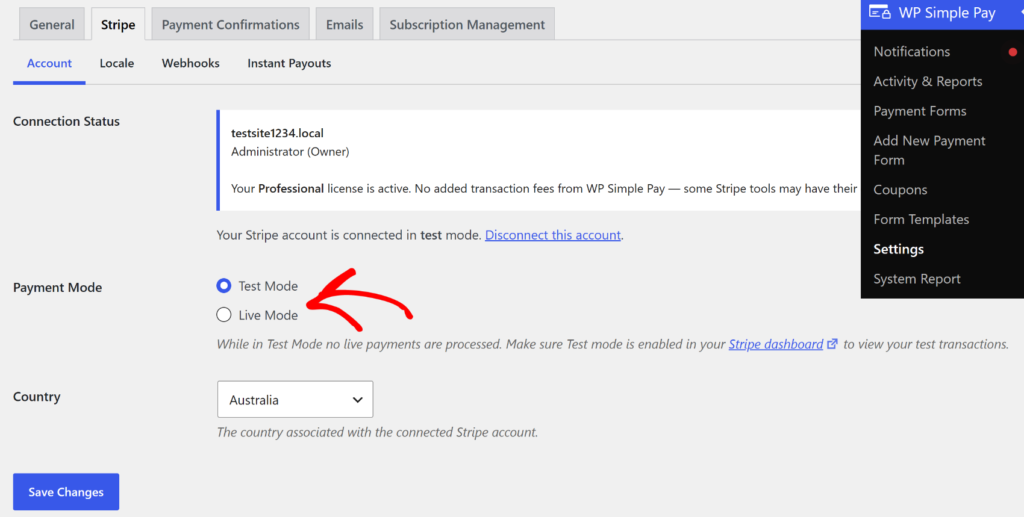
Before you switch to Live Mode, there’s one more place to check.
The Connection Status field shows which Stripe account is connected, but it doesn’t tell you whether Stripe has finished reviewing your business. So it’s worth logging in to your Stripe Dashboard and finishing any activation requests you see there.
Once you’re approved, you’re ready to start building forms.
This guide on how to create perfect payment forms in WordPress is a good place to start. You might also like this one on the ideal checkout experience.
What Stripe Costs Once You’re Approved
In the US, Stripe’s standard rate is 2.9% + 30¢ per successful domestic card payment.
International cards add 1.5%, and currency conversion adds 1%.
Your WordPress plugin can add its own fee on top of that. In most countries, the free WP Simple Pay Lite adds 3% per transaction.
An active license on any WP Simple Pay Pro plan removes that extra fee. Stripe’s own processing fee still applies either way.
You’ll find the full breakdown in this guide to WP Simple Pay’s fees. And if you’re still choosing a processor, this comparison of PayPal vs. Stripe lays out the trade-offs.
Start Taking Payments Once You’re Approved
If your business passes all three checks, connecting Stripe to WordPress with WP Simple Pay takes a few minutes and no code.
Every WP Simple Pay Pro plan removes the extra 3% plugin fee, so Stripe’s processing fee is the only one you pay.
Still weighing Stripe itself? Here are the reasons it’s a strong pick for WordPress sites.
Frequently Asked Questions
1. Can I use Stripe without a registered business?
Sole proprietors in the US can use Stripe without a registered business, signing up with their SSN or ITIN instead of an EIN. Stripe still verifies your identity and address, and an unregistered business needs an owner or representative who is physically located in the US.
2. Can nonprofits use Stripe to accept donations?
Nonprofits can use Stripe to accept donations, but nonprofit and charity fundraising is on Stripe’s restricted list, so expect extra review before approval. Qualifying nonprofits can apply for Stripe’s discounted rate if at least 80% of their Stripe payment volume comes from tax-deductible donations.
3. What happens if Stripe decides it can’t support my business?
Stripe emails you, and the email links to a form you can use to appeal. Under Stripe’s Unacceptable Risk Policy, payouts are typically paused for 120 days from that first email, then Stripe reviews the account to decide what happens to the remaining balance.
4. Can I use Stripe if my country isn’t supported?
If your country isn’t supported, Stripe Atlas lets founders in most countries incorporate a US company for a $500 setup fee and then use Stripe through it. Businesses in Côte d’Ivoire, Ghana, Kenya, Nigeria, and South Africa can use Paystack, which is part of Stripe’s extended network.
I hope this article helped you learn about how your business can use Stripe for online payments. You may also want to see our guides on how to add a setup fee to your subscription payment forms and tips to boost subscription signups with free trial offers.
What are you waiting for? Get started with WP Simple Pay today!
To read more articles like this, follow us on X.
Disclosure: Our content is reader-supported. This means if you click on some of our links, then we may earn a commission. We only recommend products that we believe will add value to our readers.
Leave a Reply