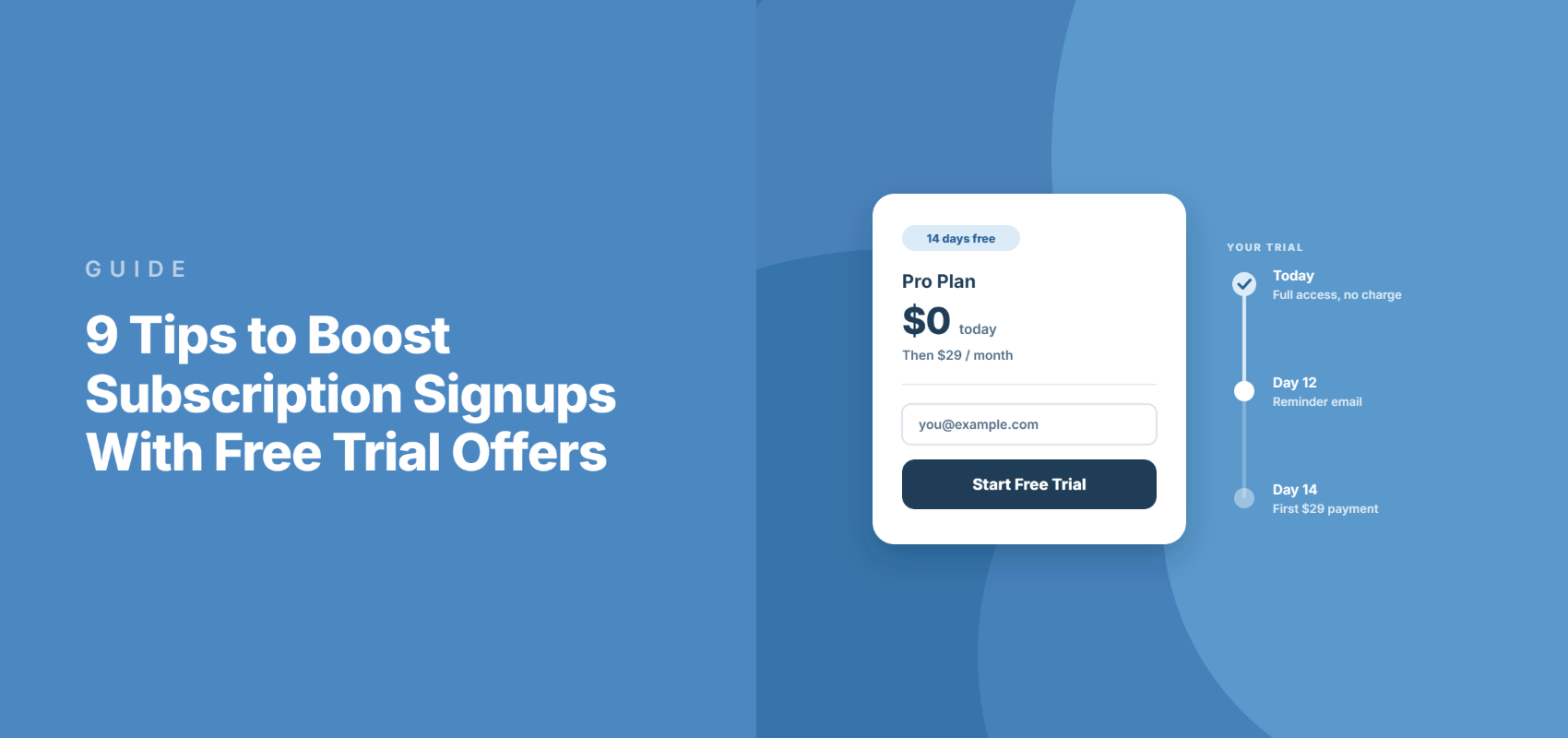
9 Tips to Boost Subscription Signups With Free Trial Offers
Last updated on

Fewer free trials turn into paying subscriptions than they did a few years ago. Recurly’s 2026 State of Subscriptions puts traditional trial conversion at 34% in 2025, down from 47% in 2021.
For a coach, a course creator, or a membership site selling through a WordPress form, most of what decides whether free trial offers convert happens on two days: the day someone signs up, and the week before you charge them.
That second date comes with a rule. Since April 2020, Visa has required merchants to send a reminder at least seven days before a trial turns into a paid subscription.
WP Simple Pay doesn’t send that reminder itself, but Stripe will with one setting. The six tips below cover both days, plus trial length, setup fees, and a failed first charge, with the setting that handles each one.
In this article, I’ll share 6 tips to boost subscription signups with free trial offers.
When Does a Free Trial Make Sense for Your Subscription?
A free trial makes sense when a customer can see the value inside the trial window, and when that value keeps arriving month after month.
An online course membership, a monthly coaching group, a paid community, or a software tool all fit, because the second month is worth as much as the first.
A one-off service doesn’t. A business only needs one logo, so a trial of a logo design service gives the work away.
If you’re still weighing whether recurring billing fits your business at all, start with whether subscription payment plans are right for your business.
1. Build the Free Trial Around the First Moment
A trial converts when the customer reaches the point where your service proves itself before the trial ends. So the job of the trial is to get them there fast.
Start by naming that moment. For a coaching membership, it might be the first group call, and for a course it might be finishing the first module.
From there, point everything the customer sees after signing up at that moment. In WP Simple Pay, two places do most of the work.
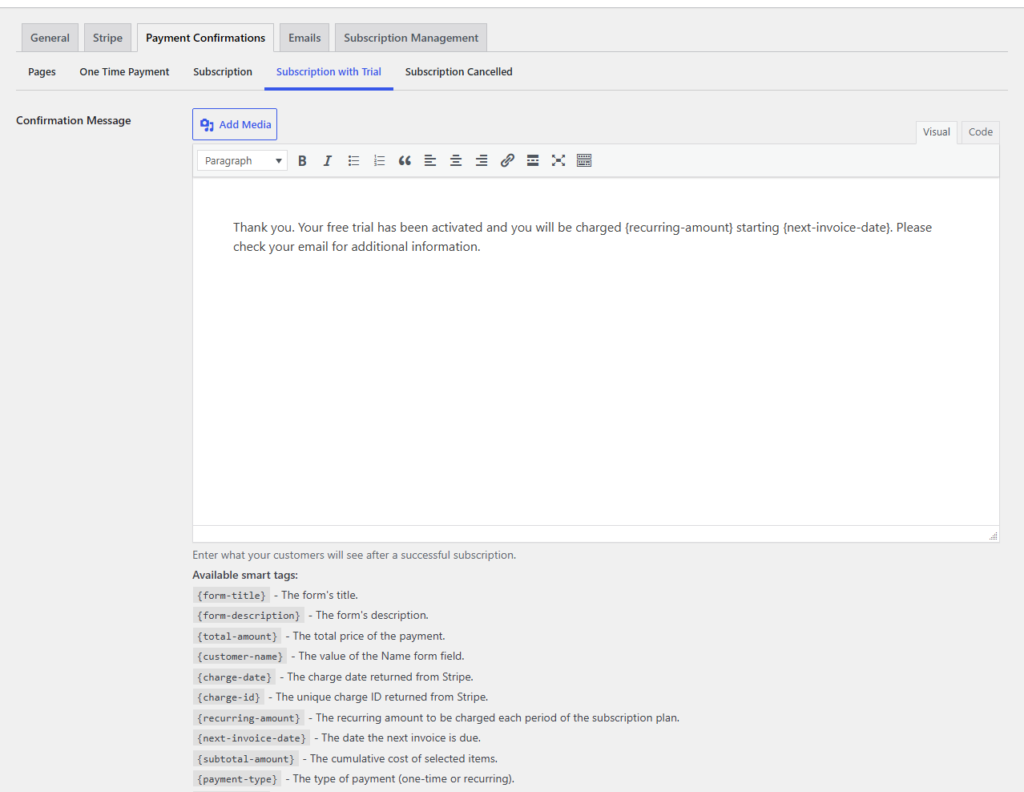
The first is the confirmation page. Under WP Simple Pay » Settings » Payment Confirmations, the Subscription with Trial message is shown only to customers who start a trial.
The second is the confirmation email. The Payment Confirmation email has a separate Free Trial Activation body, so trial signups get different wording from people who paid in full.
The default trial message already uses the {recurring-amount} and {next-invoice-date} smart tags, so the customer sees what they’ll pay and when. Add the link to their first session right below it.
If different customers reach value in different ways, add a dropdown field to the form that asks how they plan to use your service. Here’s how to collect customer data during checkout in WordPress.
2. Limit Your Free Trial Offer Duration
There’s no precise free trial duration that applies to every product or service.
Some simple products or services can get away with offering three- or five-day trials because the user only needs a few minutes to decide if they’ll sign up. Other products need to give out extended free trials for users to adopt the system.
Generally speaking, it’s best to keep your free trial under a month. That’s usually enough time for potential customers to decide if they’ll become actual customers. Keeping the trial under a month also encourages the user to try it and make his or her decision soon.
With all that being said, don’t stick with a month because it’s what everyone else is doing. Experiment with free trial lengths to see which one converts the most customers.
WP Simple Pay makes it super easy to customize the duration of your free trial periods using the advanced drag & drop form builder.
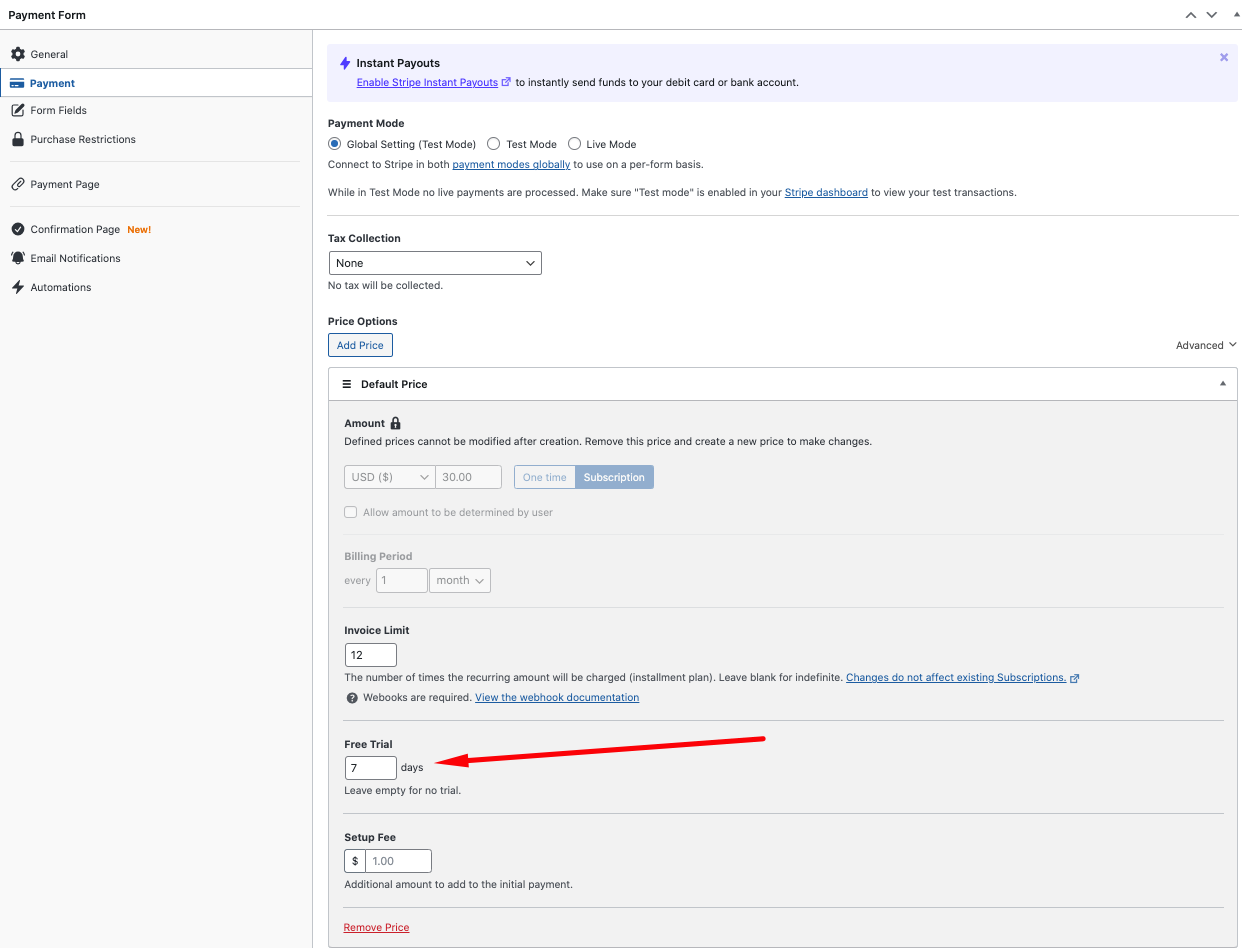
You can also use the plugin to add a setup fee that will charge the subscriber a smaller amount up front before the initial recurring payment. This fee can be used to offset the cost of offering a free trial period.
3. Collect the Card Up Front
Trials that ask for a card at signup convert far better than trials that don’t, because the people who start them have already decided they might pay.
First Page Sage’s benchmark of 86 SaaS companies found card-required trials converting at 48.8%, against 18.2% for no-card trials from organic traffic, according to its free trial conversion benchmarks. Those are agency clients rather than a neutral panel, but Recurly’s 2022 data shows the same gap: 39.0% against 12.0%.
WP Simple Pay takes the card-up-front route on every trial. It saves the customer’s payment method when the trial starts and charges nothing that day unless you’ve added a setup fee.
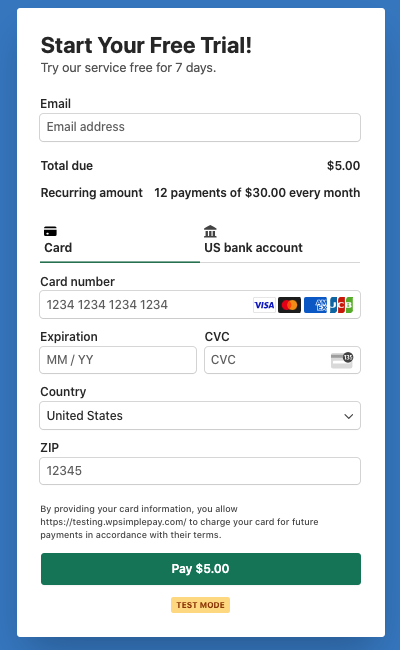
So your job is to make sure nobody is surprised by it. The payment button reads Start Trial by default, and Stripe’s card field adds a line saying the customer authorizes charges until they cancel.
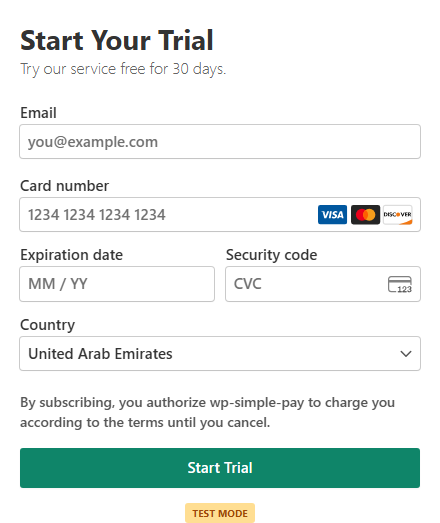
What the form doesn’t show on its own is the price after the trial. On a single-price form, the trial template’s description says “Try our service free for 30 days” and nothing more, so add the price and billing period to the form description yourself, for example, “then $25 a month, cancel anytime.”
Hiding the card requirement is a mistake to avoid, so a customer who didn’t realize they’d be charged has an easier path to a chargeback.
4. Place Limits on Free Trials
Besides giving users unlimited access to your services for a limited duration, another way to offer an effective free trial is to let people use a limited version of your product for an unlimited time.
In fact, here at WP Simple Pay, we offer a free lite version of our WordPress plugin that lets users accept several payment methods on their site.
If you offer digital products or have a membership site that provides valuable content on a regular basis, you can place access limits for your free subscribers that encourage them to eventually sign up for full access to paid content.
Here are a few different ways to place limits on your product or service.
- Feature Limit – Disable features or functions for free accounts.
- Usage Limit – Limit how many actions users can take (e.g., emails they send, payments they process, times they log in).
- Capacity Limit – Caps on how much information they can store (100 contacts, 2000 records, 1 TB of storage, 5 downloads).
- Output Limit – Limit or reduce what they create with your product so it can’t be used fully (a watermark on produced images and license restrictions are just a couple of examples).
What’s right for your products or services can be a mix of some of those limitations or something entirely different. Don’t feel locked into the “30 days free” model.
5. Match the Trial Length to Delivering Value
The right trial length is the shortest one that gets a typical customer to that first moment of value.
Shorter usually wins. In Recurly’s 2022 acquisition data, trials of seven days or less converted at 40.4%, while trials longer than 61 days converted at 30.6%, per its State of Subscriptions acquisition report.
So if your value shows up in the first group call, a 7-day trial is plenty. If it takes three weekly sessions, a 30-day trial is the honest choice.
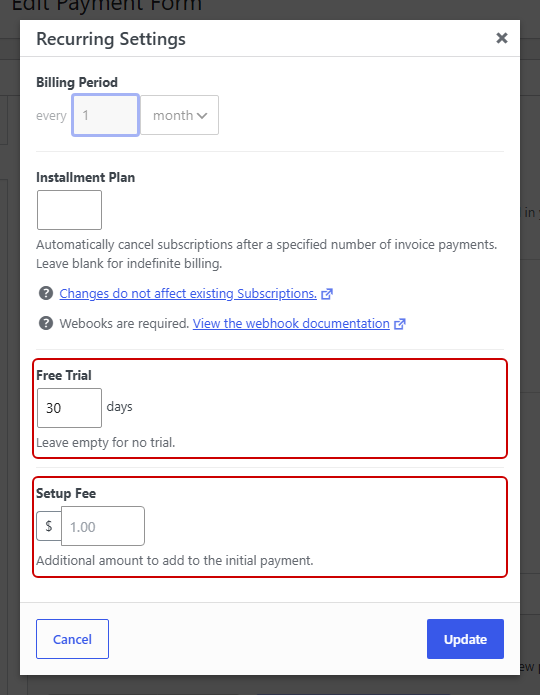
In WP Simple Pay, the Free Trial field takes a number of days, and leaving it empty means no trial. It sits in each subscription price’s Recurring Settings and needs the Professional plan or higher.
6. Divide Your Customers Into Segments
Even if your product or service inhabits a small industry or tiny niche, you still probably have multiple customer segments. Each segment has its own problems, needs, and preferences for a product or service like yours.
The purpose of your free trial is to help your users realize the value of your product. Think about how you can show that your product is improving your customers’ lives. It’s a good idea to design different versions of your free trial that appeal to each customer segment. That way, you can make sure each customer achieves what they find valuable.
How do you break customers into segments? It’s as simple as adding one extra field to your subscription payment form. Alternatively, you can create a branching onboarding process where the first step asks the user in a straightforward way how they intend to use the product.
For instance, you might add a field to your payment form that asks for their company size. Depending on their answer, you could funnel them into a different onboarding process so your free trial meets their needs.
WP Simple Pay allows you to easily add customized fields to your subscription payment forms. You can collect the information you need using dropdowns, text fields, and checkboxes.
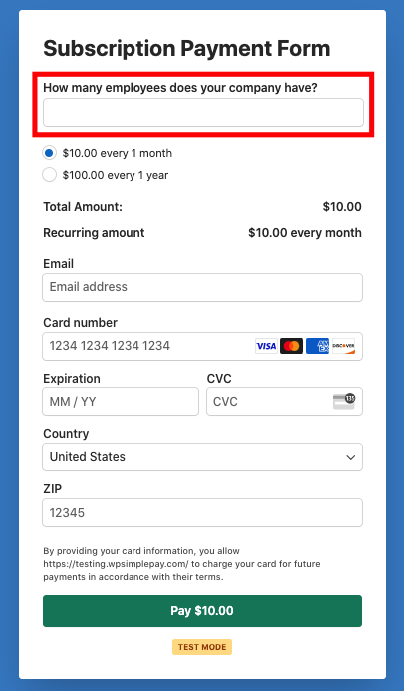
This is especially important if your product or service has many features or solves many problems. Without segmenting your users, there’s a good chance your onboarding process wouldn’t show the value you can create for them.
7. Use a Setup Fee When Onboarding Costs You
A setup fee is worth adding when you do real work before the trial ends, like an intake call or building a client’s account.
WP Simple Pay charges the Setup Fee at signup even when the price has a free trial. The plugin describes it as an “additional amount to add to the initial payment,” so the customer pays that fee today and the subscription price once the trial ends.
That also filters out people who sign up with no intention of staying, which keeps your onboarding time for the ones who might.
The common mistake is advertising a trial as “free” when the customer pays something on day one. Call it what it is, for example, “14 days free, plus a $25 onboarding fee today.”
Like the trial itself, the setup fee requires the Professional plan or higher. Here’s the full walkthrough on how to add a setup fee to a Stripe subscription in WordPress.
8. Send the Reminder Before the First Charge
Before a free trial turns into a paid subscription, you need to remind the customer and give them a way to cancel online.
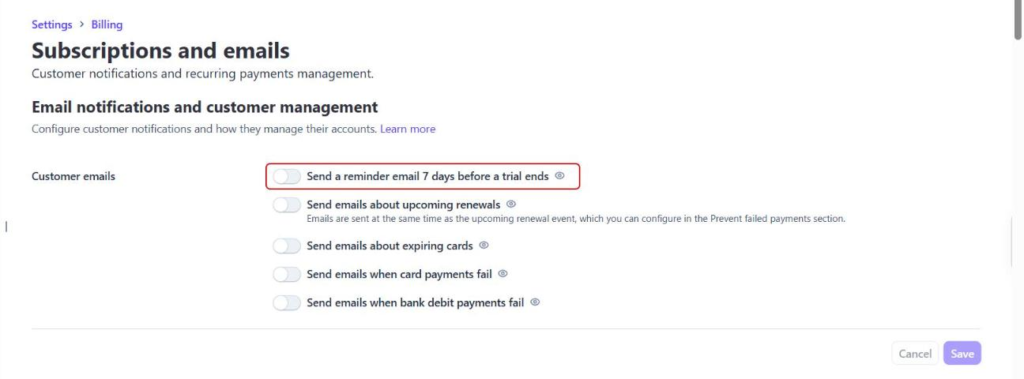
In Stripe, you enable the option to send reminder emails to customers. To turn it on, head to Settings » Billing » Subscriptions and emails in your Stripe Dashboard.
From there, under Customer emails, turn on Send a reminder email 7 days before a trial ends and save.
Stripe’s reminder includes a cancellation link and a link to update payment details. If the trial is shorter than seven days, Stripe sends it as soon as the trial starts.
Do note that Stripe doesn’t send trial reminders from a sandbox, so you won’t see it while testing.
Give Customers a Way to Cancel
Next, decide how customers manage their own subscriptions. Under WP Simple Pay » Settings » Subscription Management, you can choose None, On-site, or Stripe Customer Portal.
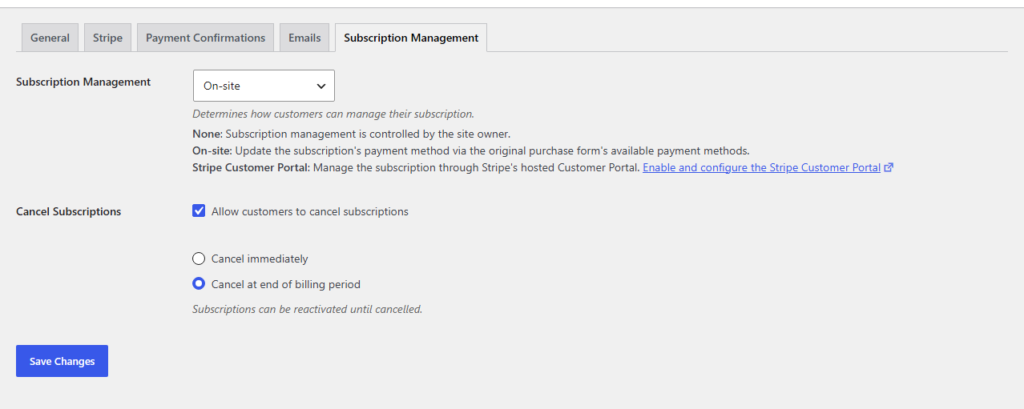
With On-site, the Cancel Subscriptions option lets customers cancel themselves, either Cancel immediately or Cancel at the end of the billing period.
If you pick Stripe Customer Portal, check one portal setting: by default, a customer who changes a subscription that’s still in its trial ends the trial early.
Here’s more on how to allow customers to manage subscriptions in WordPress.
9. Engage and Follow Up During Free Trial
If your customer is using your product’s free trial, there’s a good chance you aren’t the most important thing happening in their life. Oftentimes, people forget about their trial and let the time expire.
You need to reach beyond your product and create additional touchpoints with your users to remind them that you exist.
This could be as simple as sending a sequence of emails with deep links that push them along the onboarding process. If, for instance, they don’t engage with a particular feature within the first three days of the trial, send them an email prompting them to check it out. You might also reach out to them personally by email to introduce them to the feature.
You can also send them emails with helpful tutorials and additional ways to use your products or services.
How to Set Up a Free Trial Subscription in WP Simple Pay
Setting up the trial itself takes a few minutes. Free trials and setup fees need the WP Simple Pay Professional plan or higher.
- Open a payment form. You can edit an existing form or start from the Recurring Services with Trial Period Form template, which comes with a 30-day trial.
- Make the price a subscription. On the Payment tab, click Subscription on the price option you want to offer as a trial.
- Open the recurring settings. Click Configure to open the Recurring Settings dialog.
- Set the trial length. Enter the number of days in Free Trial, and add a Setup Fee if you charge one.
- Save and test. Update the form, then run a test signup in Stripe test mode to check the confirmation page and email.
For the full step-by-step with every screen, see how to add a Stripe free trial subscription in WordPress.
Frequently Asked Questions
1. Do I need a credit card to offer a free trial?
A free trial doesn’t require a credit card, but trials that collect one at signup convert at a much higher rate. Stripe supports no-card trials, while WP Simple Pay always saves the customer’s payment method when the trial starts and charges nothing that day unless the price includes a setup fee.
2. How long should a free trial be?
A free trial should last long enough for a typical customer to reach the first real result, and no longer. Recurly’s 2022 data found trials of seven days or less converted at 40.4%, compared with 30.6% for trials longer than 61 days. Stripe allows trials of up to 730 days.
3. Do I have to send a reminder before a free trial ends?
Visa requires a reminder at least seven days before a free trial converts to a paid subscription, with a link to cancel online. Mastercard asks for a similar notice 3 to 7 days before the trial ends. Stripe can send the reminder automatically with its “Send a reminder email 7 days before a trial ends” setting.
4. What happens if a recurring payment fails after the trial?
Stripe retries the payment on a schedule you choose, with “8 tries within 2 weeks” as its recommended default. It can also email the customer to update their card. WP Simple Pay leaves retries and failed-payment emails to Stripe.
5. Can customers update their own card or cancel a subscription?
Customers can update their own card and cancel once you turn on subscription management. In WP Simple Pay, the Subscription Management setting lets you choose On-site management or Stripe’s hosted Customer Portal, and you can set cancellations to take effect immediately or at the end of the billing period.
Final Thoughts
Free trial offers convert when the customer reaches value quickly, knows exactly when they’ll be charged, and can leave without a fight.
If you want trials and setup fees on your own WordPress forms, they come with the WP Simple Pay Professional plan. For the basics of recurring billing, read how to accept recurring payments in WordPress.
Disclosure: Our content is reader-supported. This means if you click on some of our links, then we may earn a commission. We only recommend products that we believe will add value to our readers.