6 Reasons Why You Should Accept Digital Wallet Payments
Last updated on

Are you wondering why you should accept digital wallet payments, including Apple Pay / Google Pay / Microsoft Pay, Cash App Pay, Alipay, and more on your WordPress site?
A digital wallet is an app that stores a customer’s card details on their phone or computer, allowing them to pay with one tap instead of typing in a card number.
Apple Pay, Google Pay, and Microsoft Pay are the three you’ll run into most on WordPress sites, alongside Cash App Pay, Alipay, and GrabPay for specific markets.
Not only does accepting digital wallet payments help globalize your business, but it also aids in increasing conversion rates by offering your customers their preferred payment method.
In this article, we’ll share the top reasons why you should accept digital wallet payments.
What are Digital Wallets?
Digital wallets are apps that store a customer’s debit or credit card details on their phone, tablet, or computer, allowing them to pay with a tap instead of typing in card numbers.
The wallet passes an encrypted, tokenized version of the card to the merchant, so the actual card number never touches your checkout form.
The most common digital wallets you’ll see on a WordPress payment form are Apple Pay, Google Pay, and Microsoft Pay, followed by Cash App Pay, Alipay, and GrabPay for customers in specific regions.
With digital wallets, users can make both online and in-person purchases. The wallet instantly transmits payment information to point-of-sale devices located in stores or auto-populates payment fields on eCommerce sites.
Where Digital Wallets Are Actually Used
Digital wallet adoption isn’t evenly spread, and knowing where your customers are changes how much this matters for your site.
Globally, digital wallets accounted for 56% of e-commerce transaction value in 2025, ahead of credit cards (20%), debit cards (10%), and buy now, pay later (4%), according to Worldpay’s 2026 Global Payments Report.
That average hides a lot of regional variation worth knowing before you decide how much to promote wallets on your own site:
- Asia-Pacific is the most wallet-led region in the world, with digital wallets making up 77% of online spend in 2025. India alone sees 68% of e-commerce spend go through wallets.
- The United States sits well below the global average, at roughly 40% of online transaction value, with credit cards still doing a lot of the work.
- Canada trails the U.S. slightly, with digital wallets accounting for around 32% of e-commerce spend and credit cards accounting for a similar or larger share.
If most of your customers are in North America, digital wallets are a meaningful conversion lever but not the dominant one yet. If you sell into APAC markets, especially India, Hong Kong, or South Korea, wallets are closer to the default expectation than the alternative.
Why Should You Accept Digital Wallet Payments?
If you don’t let your customers pay with their preferred wallet, you’re leaving money on the table for a checkout option that costs you nothing extra to offer. Here’s what I’d weigh.
Let’s go over the top reasons why you should begin accepting digital wallet payments on your WordPress site as soon as possible.
1. Digital Wallet Payments are Fast and Convenient
Surely, you know the importance of making online transactions as simple and painless as possible for your customers. Your goal should be to streamline your payment process, reduce friction, and remove any obstacles between your customers and making purchases.
Digital wallets let a customer pay with one tap because their card is already loaded on the device. There’s no reaching for a physical card, no re-typing a 16-digit number on a phone keyboard, and no abandoned cart because someone couldn’t find their wallet.
That convenience compounds on mobile, where typing card details is slower and more error-prone than on desktop. If most of your traffic is mobile, this is the single biggest lever in this list.
2. Digital Wallet Payments Are Secure
Customers and clients care about data security and privacy more than ever before. Their fears are valid, of course, considering how often we learn about major data breaches. Even though they know that they can initiate a chargeback for fraudulent charges, they still don’t want to deal with the hassle.
Digital wallets store an encrypted, tokenized version of the card rather than the card number itself, so a breach of your site or payment processor doesn’t expose usable card data the way a stored card number would. That’s not a marketing claim; it’s how the tokenization works under the hood.
They’re not magically immune to fraud, but the added layer means a lost phone doesn’t hand someone a working card number. Customers can lock a digital wallet remotely, the same way they’d report a lost card, without waiting on a physical replacement.
3. Accepting Digital Wallet Payments Is Simple and Easy
Unlike many other technologies, accepting digital wallet payments is quite easy, even for small businesses without many resources. You don’t need expensive plugins or pricey custom development.
In fact, most payment processors and point-of-sale systems already offer support for digital wallets. For example, if you use Stripe as your payment processor, you already have all the functionality you need to accept payments through Apple Pay, Google Pay, and Microsoft Pay on your site.
If you’re using WP Simple Pay, the best Stripe payments plugin for WordPress, to accept payments on your site, you can easily create payment forms that accept Apple Pay, Google Pay, and Microsoft Pay without a single line of code. The plugin also lets you accept Cash App Pay and Alipay.
4. Digital Wallets Work In-Person
If you ever take payments in person, whether that’s at a market stand, a workshop, or a pop-up event, digital wallets use Near Field Communication (NFC) to complete a tap-to-pay transaction in a few seconds. The customer’s phone never leaves their hand.
This matters less if you’re strictly an online business, but it’s worth knowing the same wallet setup carries over if you ever sell in person too.
As a result, you can focus on delivering value to your customer and making them feel comfortable with their transaction. It also keeps things moving efficiently, allowing you to move on to the next sale.
5. People Trust Apple, Google, and Microsoft
While your business might not be small, chances are it isn’t as big or as well-known as Google, Apple, and Microsoft. Most of us interact with these businesses every day. We buy their products, visit their apps and sites, and make plenty of purchases from them.
Over time, you begin to trust these companies with your data, especially your payment information. They make too much money to risk it all by stealing a few hundred bucks from one of their customers, and it’s in their best interest to keep your data safe, so you continue making purchases from them.
This means your customers probably trust these companies a lot more than they trust your business. It’s not that they find you untrustworthy; it’s just that when it comes to sensitive data, we generally tend to stick with what we know.
So, by leveraging these companies’ brands, you’ll capitalize on all the trust they’ve established over the years. Eventually, your customers will grow to recognize your business as trustworthy, but until then, it’s smart to ride on the coattails of Apple, Google, and Microsoft.
6. Accepting Digital Wallet Payments Boosts Conversions
The clearest business case for digital wallets is fewer abandoned carts. Removing manual card entry removes a step where customers second-guess a purchase or get frustrated and leave.
Given that digital wallets now account for 56% of global e-commerce value, not offering the option means asking a meaningful share of your visitors to use a payment method they’d rather not.
Allowing your customers to use their location-based digital wallets helps expand your business internationally and ensures that you’re catering to a much broader customer base.
Should You Enable Digital Wallets? The Trade-Offs
Here’s the part most articles skip: what actually changes operationally when you turn this on. I checked each of these against Stripe’s current documentation and pricing rather than assuming they work the same as cards.
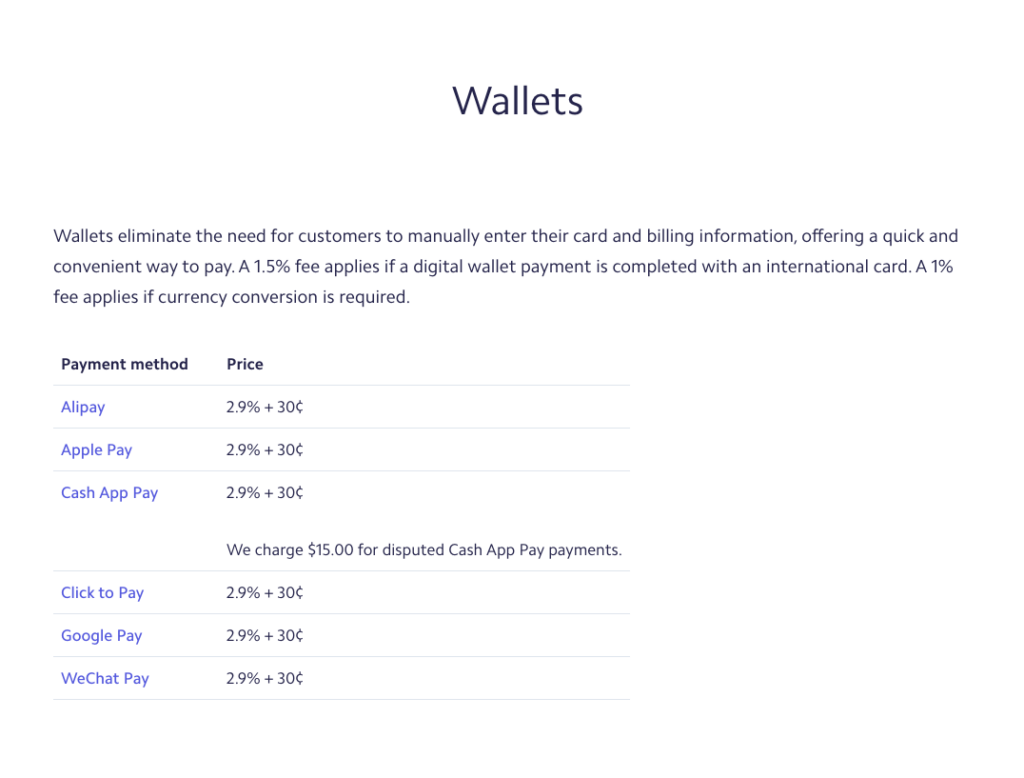
Fees. Digital wallet payments through Stripe cost the same as a standard online card transaction: 2.9% + $0.30 in the U.S. There’s no wallet surcharge. International cards and currency conversion add their usual fees on top, just as they would for a typed-in card.
Settlement time. Digital wallet payments settle on the same payout schedule as regular card payments through your Stripe account. There’s no separate or slower payout track for wallets.
Refunds and chargebacks. Because a wallet transaction is still a card transaction underneath, refunds and disputes work exactly like they do for typed-in cards, including the same $15 dispute fee if a customer files a chargeback. You don’t get extra chargeback protection from using a wallet.
Subscription support. Google Pay is fully compatible with Stripe’s recurring billing, so subscriptions renew the same way they would with a saved card.
Apple Pay works for subscriptions too, but the first charge needs to happen while the customer is present (what Stripe calls an on-session payment), so Stripe can store a reusable card token. Skip that, and later renewal charges are more likely to fail, which shows up as a support ticket, not an obvious error on your end.
So, if your traffic is mostly desktop and North American, this is a low-effort, low-risk addition, mainly for the conversion lift. If you’re selling into APAC markets or running a lot of mobile traffic, I’d treat it as close to required rather than optional.
Accepting Digital Wallets With WP Simple Pay
The best way to accept digital wallet payments on your WordPress site is to use WP Simple Pay.
The plugin makes it easy to add Apple Pay, Google Pay, Microsoft Pay, Alipay, Cash App Pay, and GrabPay to your payment forms from the drag-and-drop form builder.
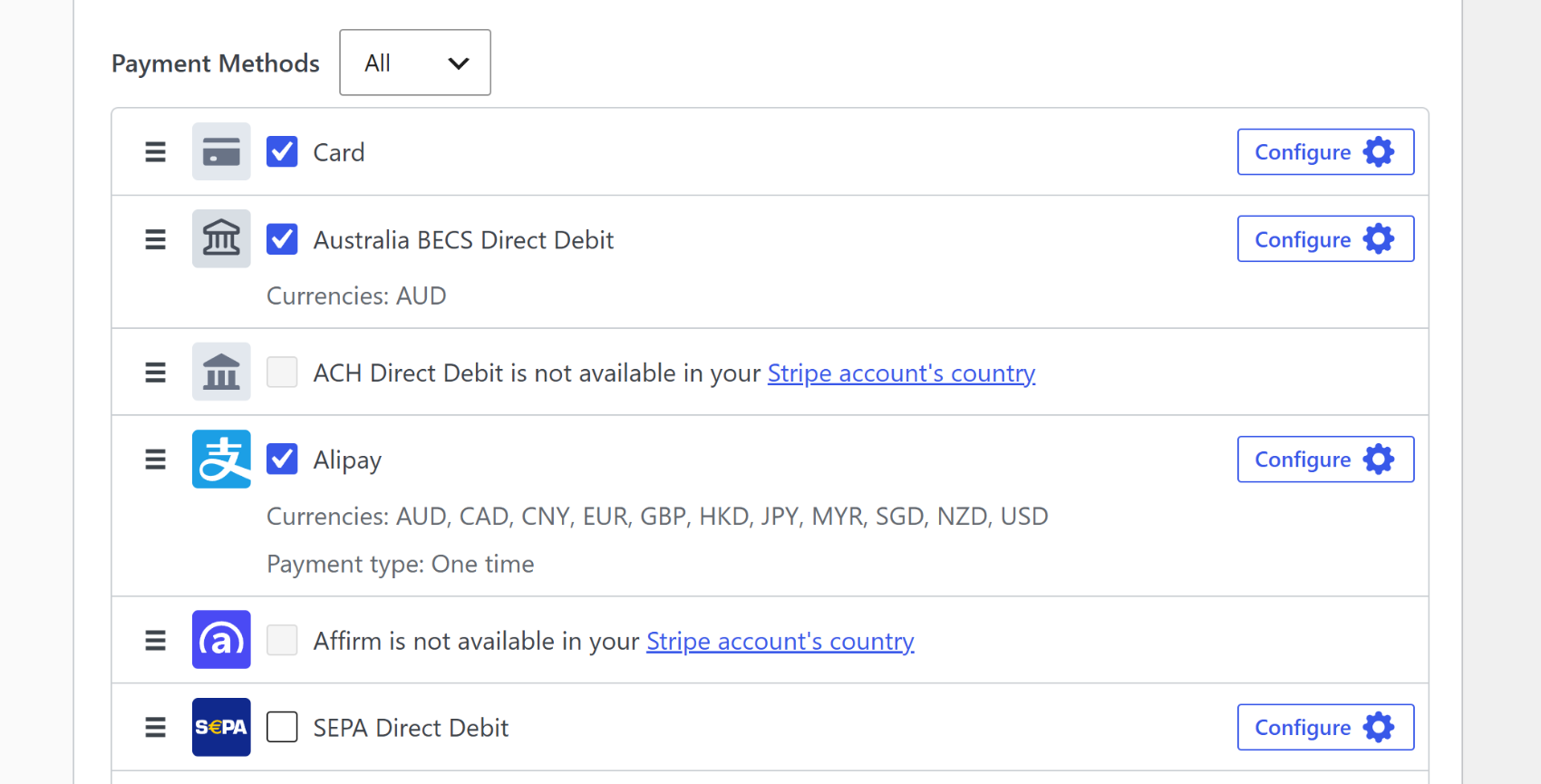
When you add a digital wallet payment method option to your payment form, any visitor with a browser and device combination that allows one of these options will see an additional payment button on the payment form.
Here’s what that looks like to your customers. All they have to do to pay is click that button to complete their purchase.
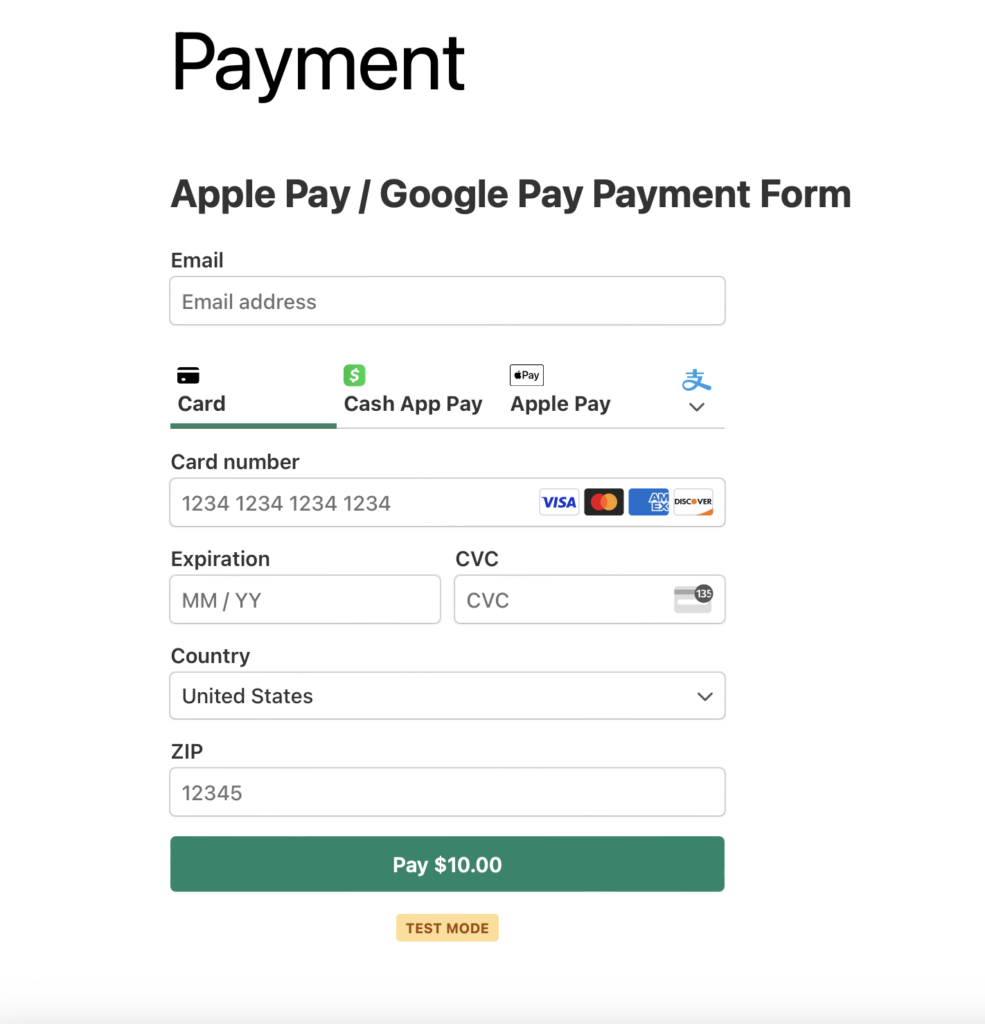
There you have it! We hope this article has inspired you to accept digital wallet payments on your site.
Troubleshooting Common Issues
The digital wallet button isn’t showing at checkout. This is almost always one of three things: the customer’s browser or device doesn’t support the wallet (Apple Pay only shows in Safari on Apple devices, for example), the customer has no card saved to that wallet, or your Stripe account is still in test mode instead of live mode. Confirm live mode first since it’s the most common culprit.
Apple Pay works for some customers but fails to charge for others. This usually means your domain isn’t verified with Apple through Stripe yet. WP Simple Pay registers your domain automatically the first time you save a form with Apple Pay enabled, but if you moved domains or changed your SSL setup afterward, you’ll need to re-verify it manually from the Apple Pay tab in your Stripe Dashboard.
A customer’s currency or country isn’t supported. Not every wallet is available in every currency or country. Google Pay and Apple Pay have broad coverage, but Cash App Pay, Alipay, and GrabPay are restricted to specific regions or currencies. Check Stripe’s payment method support page for the specific wallet and currency combination before assuming it’s a bug.
FAQs about Digital Wallets
1. Does Stripe support Apple Pay and Google Pay for subscriptions?
It does, though the two behave a little differently. Google Pay slots right into Stripe’s recurring billing with no extra setup. Apple Pay handles subscriptions too, but it needs that first charge to happen while the customer is present so Stripe can save a token for renewals. Otherwise, later charges can fail quietly.
2. Is there an extra fee for accepting digital wallet payments?
Not on Stripe’s end. Digital wallets are billed at the same rate as a typed-in card: 2.9% + $0.30 per transaction in the U.S. The only fees that change are the usual ones for international cards or currency conversion, and those apply no matter how the card was entered.
3. Which countries support Apple Pay, Google Pay, and Microsoft Pay?
Both have wide international reach, but how often customers actually reach for them varies a lot by region. Asia-Pacific is the most wallet-heavy market, at 77% of online spend, while the U.S. sits closer to 40%. Stripe’s payment method support page has the exact country and currency breakdown.
4. Can I pass the Stripe processing fee on to my customers?
You can. WP Simple Pay Pro has a Fee Recovery setting that adds the Stripe processing fee to what the customer pays instead of coming out of your payout. It applies the same way to digital wallet payments as it does to a typed-in card, since Stripe treats them identically.
5. Do I need an SSL certificate to accept digital wallet payments?
You do, and this one isn’t optional. Stripe won’t process any payment, wallet, or otherwise, unless your site runs on SSL/HTTPS. Most hosts include a free certificate by default, and WP Simple Pay’s setup guide covers how to add one if yours doesn’t have it yet.
I hope this article helped you learn why you should accept digital wallet payments. If you liked this article, you might also want to check out our guide on how to accept ACH payments in WordPress and 11 eCommerce obstacles and how to overcome them.
What are you waiting for? Get started with WP Simple Pay today!
To read more articles like this, follow us on X.
Disclosure: Our content is reader-supported. This means if you click on some of our links, then we may earn a commission. We only recommend products that we believe will add value to our readers.