WP Simple Pay Blog

Stripe Tutorials, Tips, and Resources for WordPress to Accept Payments

Introducing WP Simple Pay 4.17.3: PIX, BLIK, and More Ways to Grow Globally

Last updated on

Written By: author avatar Cristian Rossi

If your payment forms accept Brazilian Real or Polish Złoty, there’s a good chance you’ve been quietly losing customers at checkout. Not because of pricing or product fit, but because your customers don’t want to pay by card. In Brazil, more than half of online checkouts now finish through PIX. In Poland, roughly four out of five online shoppers reach for BLIK before they reach for their wallet.

With WP Simple Pay 4.17.3, you can offer both PIX and BLIK alongside your existing payment methods with a single checkbox each. No new account to provision. No new fields to configure. The customer scans a QR code or types in a six-digit code from their bank’s app, and the payment lands in your Stripe balance within seconds.

Accept PIX in Brazil

PIX is Brazil’s instant interbank payment system, operated by the Central Bank of Brazil. Customers pay directly from their bank’s mobile app, payments settle in real time, and the experience is so frictionless that PIX has rapidly displaced cards as the most popular online payment rail in the country.

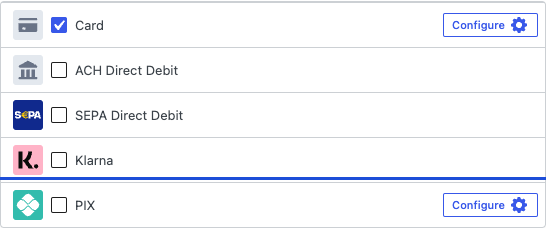
If you already accept BRL on your Stripe account, enabling PIX takes one click. Open any payment form, head to the Payment tab, and toggle PIX on. That’s it. Your Brazilian customers will see a QR code at checkout, scan it with their banking app, and confirm the payment in under a minute.

PIX payment method enabled in the WP Simple Pay form builder Payment tab. Dropdown open, showing PIX selected alongside other methods.

PIX is a single-use payment method, so it’s best suited to one-time payments rather than subscriptions. For recurring Brazilian billing, credit cards are still the right choice. Full setup details and FAQs are in our PIX documentation.

Accept BLIK in Poland

BLIK is the equivalent dominant local method in Poland. Instead of a QR code, customers generate a six-digit code in their bank’s mobile app, type it into your checkout, and approve a push notification from their bank to confirm the payment. The whole flow takes under a minute, and Polish shoppers know it well.

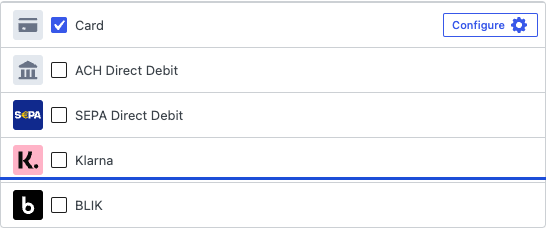
Enable BLIK the same way you enable PIX: open a PLN-priced form, find BLIK in the Payment tab’s method list, and turn it on. Your Polish customers no longer need to route through cards or a slower bank-redirect method just to give you their money.

Payment methods shown: Card is selected; ACH Direct Debit, SEPA Direct Debit, Klarna, and BLIK are available.

BLIK is one-time only. For recurring Polish payments, pair BLIK with credit cards or Przelewy24 as fallback methods. The complete walkthrough lives in the BLIK documentation.

Subscriptions for Australian Customers

If you sell to Australian customers and you’ve ever set up a subscription form, you probably noticed that BECS Direct Debit was missing from the payment-method list as soon as you switched on recurring billing. Australia was the odd one out: ACH (United States), Bacs (United Kingdom), and SEPA (European Union) all supported subscriptions, but BECS was stuck as a one-time-only method.

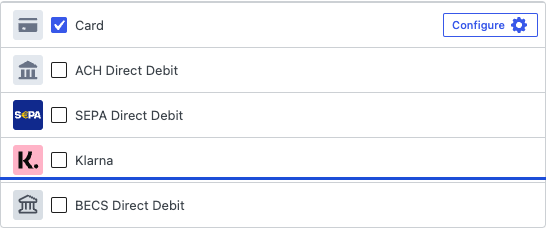
That’s fixed in 4.17.3. BECS Direct Debit now supports subscriptions and recurring billing on any AU/AUD form, bringing Australia to feature parity with the other major bank-debit markets. Customers complete the mandate authorization on the first payment, and subsequent debits run automatically on the schedule you configure.

BECS Direct Debit enabled on a payment form configured for AUD with a recurring/subscription billing interval.

Because BECS is a delayed-notification method, the first debit and each renewal can take up to three business days to confirm, exactly as before. Renewal status appears in your Stripe Dashboard and in the customer’s subscription portal. Full setup details are in the BECS documentation.

Hide Stripe Link on Off-Site Checkout

Stripe’s own Link wallet is great for autofill on first-time card entry, but some sellers would rather keep their off-site Stripe Checkout strictly card-and-bank. Maybe Link competes with your own brand language. Maybe you noticed customers completing checkout through Link in a way that bypasses your form’s tracking. Either way, you can now turn it off.

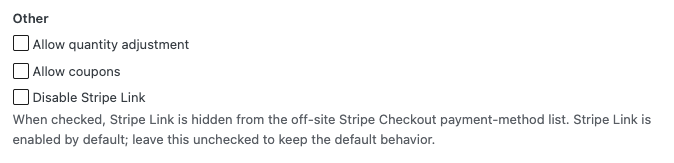
The new Disable Stripe Link checkbox in the Stripe Checkout settings tab of the form builder.

On any off-site Stripe Checkout form, head to the Stripe Checkout tab and check “Disable Stripe Link.” Customers will see only the payment methods you’ve enabled on the Payment tab. The setting is unchecked by default, so existing forms behave exactly as they did before, but the choice is now yours. Settings reference: Stripe Checkout display options.

Manage Subscriptions Without Gutenberg

The Manage Subscriptions block lets your customers update their payment method, change billing details, or cancel a subscription without contacting support. Until now, it was Gutenberg-only.

4.17.3 adds a matching shortcode, [simpay_manage_subscriptions], that works anywhere a shortcode renders: the Classic Editor, page builders that don’t process Gutenberg blocks, template parts, sidebars, or even an existing landing-page template. Same form, same secure email-link flow, same anti-spam protection. Just paste the shortcode wherever you want the form to appear.

Quality-of-Life Updates

  • Duplicating a form no longer shares Stripe IDs with the original. The “Duplicate” action now properly creates a fresh Stripe product and price set when you edit the copy’s pricing, so changes to the duplicate stop quietly mutating the original.
  • Form Style “Error” color now applies to validation errors. If you customized the error color on the Form Style tab and wondered why required-field highlights still showed default red, that’s been resolved.
  • Background scheduler is cleaner. The Action Scheduler no longer creates duplicate entries when requests arrive concurrently. Most sites won’t see a visible difference, but busy sites will notice cleaner logs.

Ready to Upgrade?

WP Simple Pay 4.17.3 is rolling out now. From your WordPress admin, head to Plugins and click Update on WP Simple Pay Pro to get the new payment methods, the Australian subscription unlock, and the rest of the release in your forms today.

If you run into anything unexpected, our support team is here to help. And if there’s a payment method, country, or feature you’d love to see next, we’d love to hear from you. The full list of changes is on the changelog page.

Disclosure: Our content is reader-supported. This means if you click on some of our links, then we may earn a commission. We only recommend products that we believe will add value to our readers.

Leave a Reply

Your email address will not be published. Required fields are marked *

This site uses Akismet to reduce spam. Learn how your comment data is processed.

Start Accepting Payments Today

Start accepting one-time and recurring payments or donations on your WordPress website.