
How to Accept BLIK Payments
In This Document
Reading time: 3 minutes | Difficulty: Beginner
Overview
BLIK is a Polish payment system that lets customers authorize payments using a 6-digit code generated by their bank’s mobile app. It’s the most-used online payment method in Poland — around 4 out of 5 Polish online shoppers prefer BLIK over cards or transfers.
Adding BLIK to your payment form removes friction for Polish customers: no card details, no bank login redirect, just a quick code entry from a familiar app.
| Payment Method Type | Code-based authorization |
| Relevant Payer Geography | Poland |
| Presentment Currency | PLN |
| Country Availability | Poland |
| Recurring Payments | No |
| Refunds | Yes |
| Disputes | No |
| Payment Completion | Immediate |
Prerequisites
- WP Simple Pay Plus, Professional, or Elite license.
- A Stripe account that supports BLIK. BLIK is available to Stripe accounts in eligible regions — check the Stripe BLIK documentation for the latest availability.
- A payment form configured for PLN (Polish Złoty). BLIK is only offered when the form currency is PLN.
Step 1: Enable BLIK
To accept BLIK payments, visit the Payment tab in the payment form builder and enable BLIK.
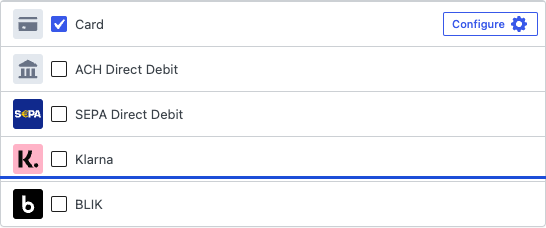
If BLIK is not visible in the list, confirm:
- Your form’s currency is set to PLN on the General tab.
- Your Stripe account has BLIK enabled. You can verify this in your Stripe Dashboard’s Payment methods settings.
Step 2: Customer Experience
When a customer selects BLIK during checkout:
- WP Simple Pay creates a BLIK payment request via Stripe.
- Stripe prompts the customer to open their Polish bank’s mobile app and generate a 6-digit BLIK code.
- The customer enters the code on your checkout page.
- The bank app pushes a confirmation notification — the customer approves it within 60 seconds.
- The payment is captured immediately and the customer is redirected to your confirmation page.
Frequently Asked Questions
Can I use BLIK for subscriptions or recurring payments?
No. BLIK is a single-use, one-time payment method. For recurring billing from Polish customers, use credit cards or Przelewy24.
What happens if the customer doesn’t approve the code in time?
BLIK codes are valid for 2 minutes after generation, and the bank-app confirmation has a ~60-second window. If the customer doesn’t approve in time, the payment fails and no funds move. The customer can simply request a new code and try again.
Are there fees beyond Stripe’s standard rate?
BLIK has its own Stripe fee schedule. Check the Stripe pricing for Poland page for current rates.
Can I refund a BLIK payment?
Yes. BLIK refunds are processed through the standard Stripe Dashboard workflow.
What’s Next?
- Accepting Przelewy24 Payments — the secondary Polish payment method, useful for customers without BLIK-enabled banks.
- Accepting PIX Payments — Brazil’s instant payment system.
- Currency and Locale Settings — set your form’s currency to PLN.
- Which Payment Methods Does WP Simple Pay Support?
Still have questions? We're here to help!
Last Modified: