
How to Accept PIX Payments
In This Document
Reading time: 3 minutes | Difficulty: Beginner
Overview
PIX is Brazil’s instant payment system, run by the Central Bank of Brazil. It lets customers pay directly from their bank’s mobile app by scanning a QR code or entering a PIX key — payments settle in seconds and the merchant receives funds in their Stripe balance immediately.
PIX is now the dominant payment method for Brazilian online checkouts, regularly outperforming credit and debit cards in conversion. Adding PIX to your payment form unlocks the preferred way Brazilian customers want to pay.
| Payment Method Type | Real-time bank transfer |
| Relevant Payer Geography | Brazil |
| Presentment Currency | BRL |
| Country Availability | Brazil |
| Recurring Payments | No |
| Refunds | Yes |
| Disputes | No |
| Payment Completion | Immediate |
Prerequisites
- WP Simple Pay Plus, Professional, or Elite license.
- A Stripe account that supports PIX. PIX is available to Stripe accounts in eligible regions — check the Stripe PIX documentation for the latest availability.
- A payment form configured for BRL (Brazilian Real). PIX is only offered when the form currency is BRL.
Step 1: Enable PIX
To accept PIX payments, visit the Payment tab in the payment form builder and enable PIX.
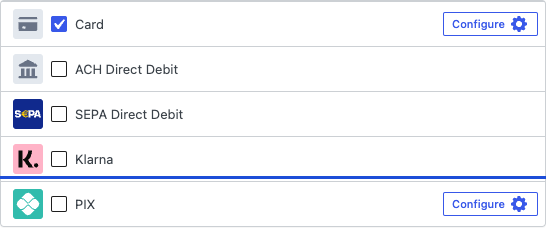
If PIX is not visible in the list, confirm:
- Your form’s currency is set to BRL on the General tab.
- Your Stripe account has PIX enabled. You can verify this in your Stripe Dashboard’s Payment methods settings.
Step 2: Customer Experience
When a customer selects PIX during checkout:
- WP Simple Pay creates a PIX payment request via Stripe.
- Stripe presents the customer with a QR code (and a copy-paste PIX key).
- The customer opens their Brazilian bank’s mobile app, scans the QR code (or pastes the key), and authorizes the payment.
- The bank initiates an instant transfer; the customer is redirected back to your confirmation page.
- The payment is captured in your Stripe balance, typically within seconds.
The QR-code UI is rendered by Stripe — no extra configuration is needed on your form.
Frequently Asked Questions
Can I use PIX for subscriptions or recurring payments?
No. PIX is a single-use, one-time payment method. For recurring payments from Brazilian customers, you’ll need to use credit cards, which support recurring billing in BRL.
What happens if the customer doesn’t complete the payment?
PIX payments have a short expiration window (set by Stripe). If the customer doesn’t authorize the payment in their bank app before it expires, the payment fails and no funds are moved.
Are there fees beyond Stripe’s standard rate?
PIX has its own Stripe fee schedule, which is typically lower than card processing in Brazil. Check the Stripe PIX pricing page for current rates.
Can I refund a PIX payment?
Yes. PIX refunds are processed through the same Stripe Dashboard workflow as any other payment method and are typically completed within 1 business day.
What’s Next?
- Accepting BLIK Payments — Poland’s dominant payment method.
- Currency and Locale Settings — set your form’s currency to BRL.
- Which Payment Methods Does WP Simple Pay Support?
Still have questions? We're here to help!
Last Modified: