
Introducing WP Simple Pay 4.17.2: Build Dynamic Payment Forms With Conditional Logic
Last updated on

You’ve built a payment form that works. But then a customer wants to add a gift message, only sometimes. Another wants to enter a company name, but only if they’re a business. Suddenly your one tidy form needs to handle three different scenarios, and you’re either cluttering it with fields nobody uses or building separate forms for every variation.
With WP Simple Pay 4.17.2, your forms can finally adapt to the person filling them out. The new conditional logic engine lets you show or hide any field based on what customers have already entered, all without writing a single line of code.
Smart Forms That Respond to Your Customers
Conditional logic is the kind of feature that quietly transforms how you collect payments. Instead of one rigid form for every customer, you can build a single, intelligent form that reveals the right fields at the right moment.
Selling a product with optional gift wrapping? Show the recipient name and message fields only when the gift checkbox is ticked. Running a service business that handles both individuals and companies? Hide the VAT and company name fields unless someone selects “Business” from a dropdown. Offering a tiered subscription? Surface different add-on questions depending on which plan they pick.
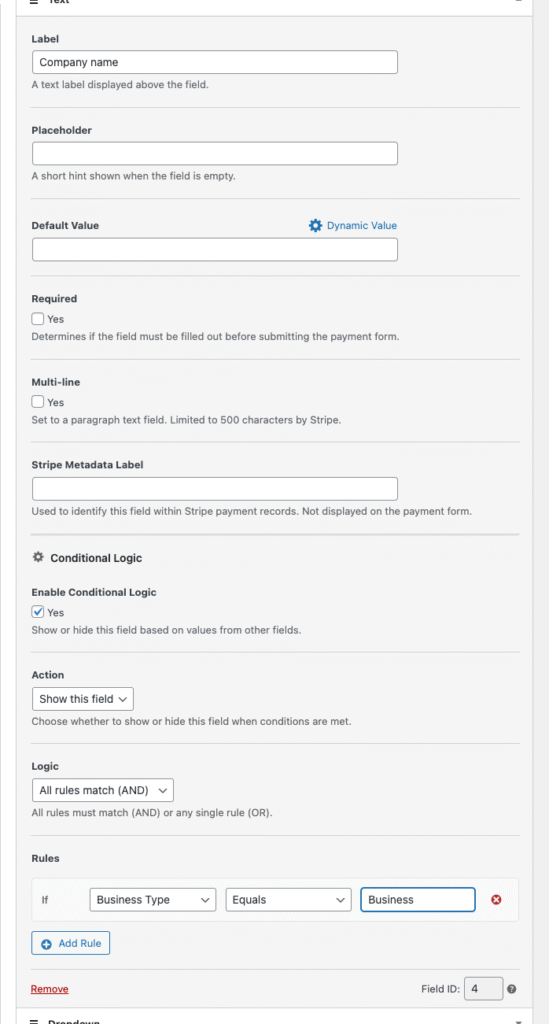
Setting it up is straightforward. Each eligible field in the form builder now has a Conditional Logic panel where you can:
- Enable conditional logic with a single toggle
- Choose whether to show or hide the field when rules match
- Add one or more rules that reference other fields on the same form
- Combine multiple rules with “all” or “any” matching for simple or complex flows
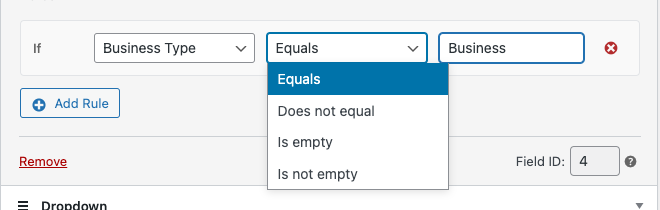
Rules can target field values, selected price options, checkbox states, or even check whether a field is empty or contains specific text. Operators include equals, does not equal, contains, does not contain, greater than, less than, is empty, and is not empty.
The best part is what happens on the frontend. Fields hidden by conditional logic are not just invisible, they’re fully removed from validation and submission. So a required field that’s been conditionally hidden won’t block your customer at checkout, which has been a common pitfall with conditional logic in other tools.
Conditional logic works across the full range of form fields: text inputs, name, email, phone, dropdowns, radio buttons, checkboxes, price selectors, address blocks, coupon, tax ID, custom amount, and more. You can read more about form fields in the documentation.
Personalize Receipts with Billing Location
Two new smart tags, {billing-country} and {billing-zip}, are now available in payment confirmation pages and every email template. They pull the billing country and postal code from the payment method your customer used, whether that’s Stripe Checkout or the Payment Element.
This opens up subtle but useful personalization. You can include region-specific shipping instructions in a confirmation email, remind customers in certain countries about local tax requirements, or simply acknowledge where someone is buying from. If a customer is in Germany, you can greet them differently than a customer in Canada, all from the same template.
Learn more about using smart tags in confirmation pages and emails.
Smoother Overlay Forms for Klarna, Afterpay, and Automatic Tax
If you’ve ever built a Payment Button overlay form that uses Klarna, Afterpay/Clearpay, or Stripe’s automatic tax, you may have run into a frustrating issue: certain required fields like the Address block and the amount breakdown didn’t get added automatically. You had to add them manually, and there was no warning if you didn’t.
That’s fixed in 4.17.2. Overlay forms now go through the same required-field checks as embedded forms, so the right fields are added automatically when you save, along with a helpful notice. One less thing to remember when you’re configuring Klarna or Afterpay/Clearpay.
More Improvements in This Release
- Stability improvements around the new billing smart tags so confirmation pages and emails handle Stripe API hiccups gracefully.
The full list of changes is always available on the changelog page.
Start Building Smarter Forms Today
WP Simple Pay 4.17.2 is rolling out now. Update from your WordPress dashboard to start using conditional logic, the new billing smart tags, and the smoother overlay form experience right away.
As always, if you run into any questions, our support team is here to help. And if you’ve been wanting conditional logic to do something specific in your forms, we’d love to hear about it. Your feedback shapes what comes next.
Happy selling.
Disclosure: Our content is reader-supported. This means if you click on some of our links, then we may earn a commission. We only recommend products that we believe will add value to our readers.

Leave a Reply