
Introducing WP Simple Pay 4.17.7: A Smoother Checkout on Every Device
Last updated on

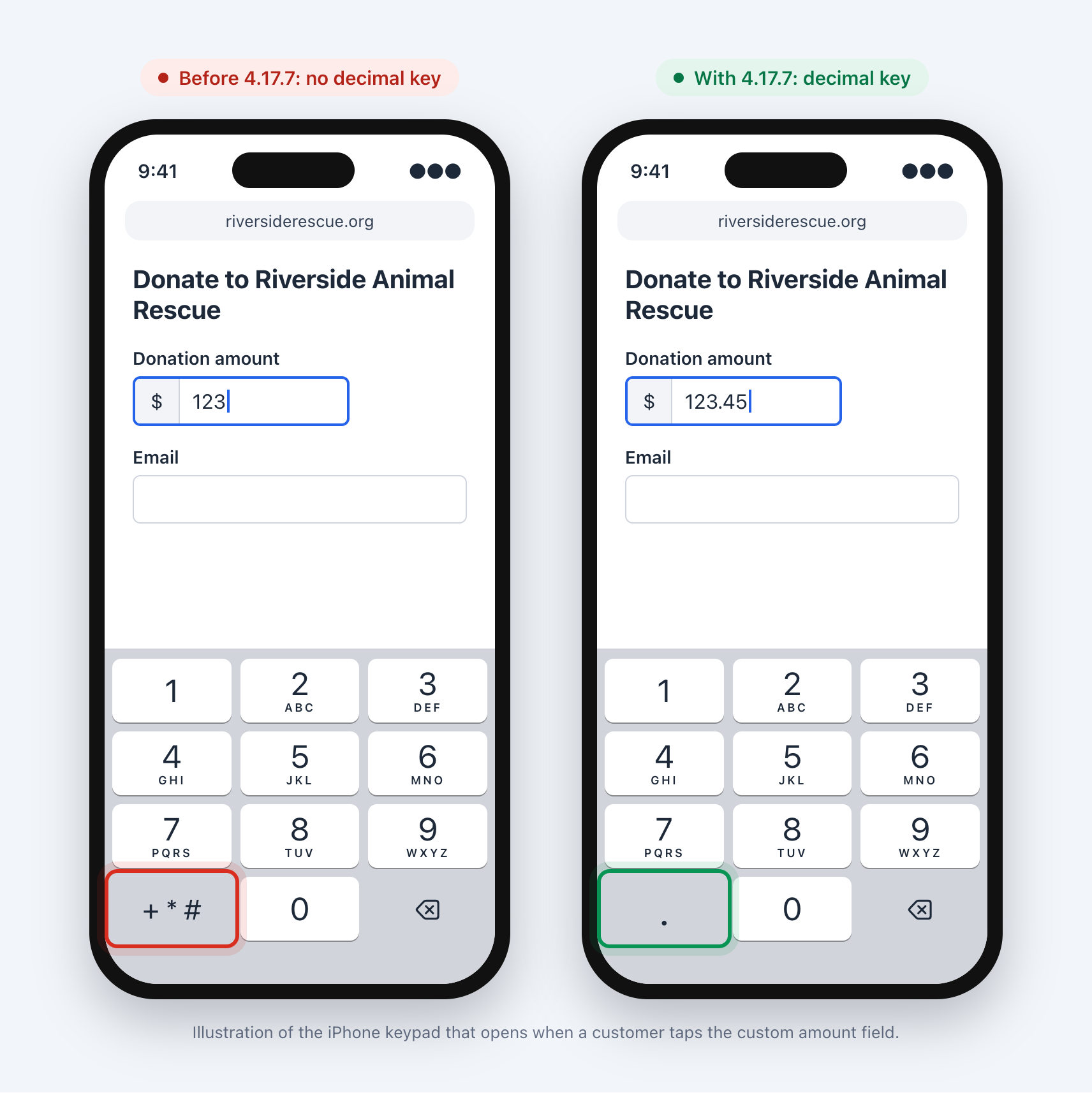
A donor opens your form on their iPhone, taps the amount field, and tries to type $123.45. There’s no decimal key. They try a few things and give up, or worse, pay the wrong amount. Then they email you to say your form “isn’t working.”
Small moments like that are where payments are won or lost. WP Simple Pay 4.17.7 is all about smoothing them out, so customers on any device can get from “I want to pay” to “done” without a hitch.
Every Customer Can Enter the Right Amount
If you let customers choose what to pay, for donations, tips, invoices, or pay-what-you-want pricing, this one’s for you. On iPhone, the custom amount field used to open the phone keypad, which has no decimal key. Amounts with cents were nearly impossible to type.
Now the field opens a number keypad with a decimal key that matches your customer’s region. And if someone types the amount the “other” way, like 123,45 on a site that uses a period, WP Simple Pay still reads it as 123.45 instead of 12,345.
There’s nothing to set up. Every form with a custom amount field gets the fix as soon as you update. Learn more about setting up donation forms.
Customers Keep Their Place on the Page
On forms with several price options, picking a price for the first time could throw the page down toward the pay button. One customer called it “disorienting,” and they were right. Your visitor is still reading their options and suddenly they’re looking at a card field.
WP Simple Pay now holds the page right where it is after a customer chooses a price. As soon as they scroll or swipe, the page moves freely again, and moving between the card number, expiry, and security code fields works just like before.
The result is a calmer checkout that lets customers choose at their own pace. If you sell multiple items or price options, your forms just got friendlier.
Use the Same Form More Than Once on a Page
Some layouts show the same payment form twice, for example a button near the top of a landing page and another at the bottom, or a page builder layout with separate mobile and desktop sections. Until now, the second copy didn’t always behave. Clicking a label could jump to the first form, a date picker could fill in the wrong date, and your Form Style settings only showed up on the first copy.
Every copy of a form now works on its own, with its own labels, date picker, and overlay buttons, and every copy uses your Form Style choices.
If you’ve added custom CSS, rules that target the form’s class keep working on every copy. Rules that target an ID, the form’s or a field’s, now apply to the first copy only, so switch them to the form’s class (for example, .simpay-form-123) to style every copy.
A Faster, Leaner Site
On a small number of sites, WP Simple Pay’s settings quietly grew larger every time they were saved. On one site they reached about 27 MB, which slowed down every page that wasn’t cached.
That growth is fixed, and a one-time cleanup runs automatically the first time you visit your dashboard after updating. In testing, it cleaned up a 33 MB record in under a second. If your site felt sluggish for no clear reason, this update may give you a nice speed boost.
More Fixes in This Release
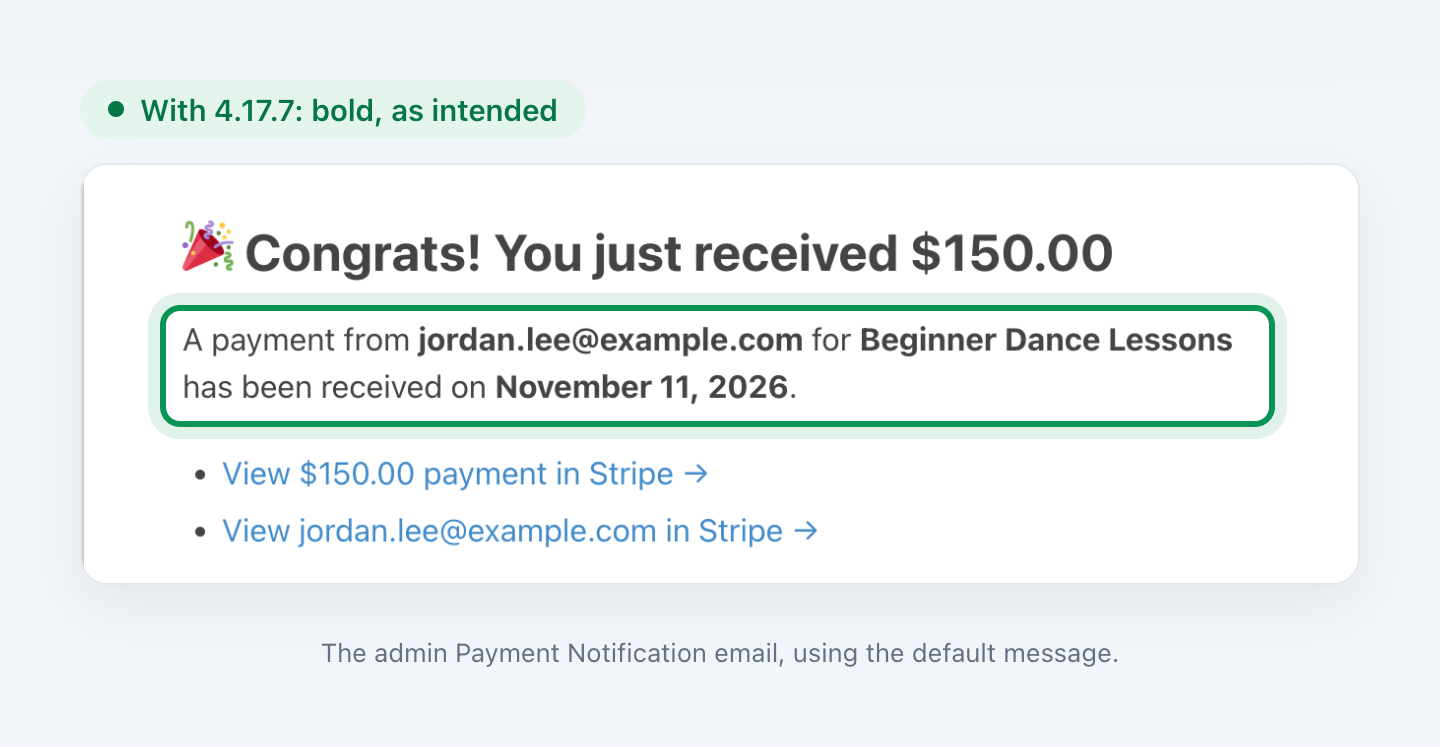
- Cleaner Payment Notification emails. The default email you receive for new payments now shows the customer email, form title, and payment date in bold instead of stray
<strong>tags. Saved emails are fixed automatically, and any changes you made to the message stay as they are. More on payment notifications. - Form previews work with Popup Maker and similar plugins, instead of showing an error.
- A quieter error log when another plugin, such as Restrict Content Pro, shares your Stripe account.
- No more critical error on WordPress.com sites that use Jetpack.
Using WP Simple Pay Lite? The faster settings, form preview, repeated form, and WordPress.com fixes are in Lite 4.17.7 too. For the full list of changes, see the changelog.
Give Every Customer a Smoother Checkout
This release clears away the small snags that make customers hesitate, from typing an amount on a phone to staying in place while they pick a price. It also keeps your site fast and your inbox tidy.
Update from your WordPress dashboard under Plugins to get every fix above. If you have any questions, our support team is happy to help.
We’d love to hear what you’d like to see next. Let us know in the comments or reach out anytime.
Disclosure: Our content is reader-supported. This means if you click on some of our links, then we may earn a commission. We only recommend products that we believe will add value to our readers.

Leave a Reply