
Introducing WP Simple Pay 4.17.5: Payment Forms That Keep Working on Cached Pages
Last updated on

Your payment form worked perfectly this morning. You tested it, the payment went through, and everything looked great. Then, a few hours later, a customer emails you to say the form just shows an error.
If that sounds familiar, the culprit was almost always page caching. Caching makes your site fast by saving a copy of each page, but that saved copy could carry form details that expire. With WP Simple Pay 4.17.5, your payment forms keep working on cached pages, with nothing extra to set up.
Payment Forms That Work With Your Caching Plugin
Caching plugins like WP Rocket, LiteSpeed Cache, and WP Super Cache (along with the caching many hosts turn on for you) are one of the best ways to keep a site fast. Until now, they did not always play nicely with payment forms. A cached page could serve a form whose security check had already expired, so the form failed hours after it was published.
The usual workaround was to exclude your checkout pages from the cache, or turn caching off entirely. Neither is great. One means fiddling with settings in yet another plugin, and the other slows down your whole site.
Now each payment form loads its own fresh details the moment a visitor opens the page. The cached copy of the page no longer contains anything that can go stale, so your forms keep working no matter how long the page has been cached.
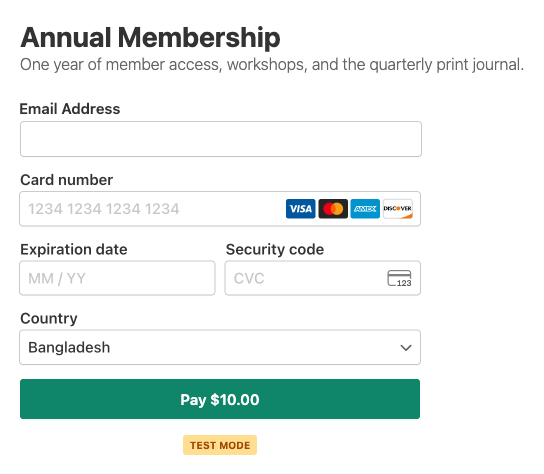
A few more things happen behind the scenes to make checkout feel smooth:
- No early clicks. The payment button waits until the form is fully ready, so a quick click can’t send a half-loaded form.
- A clear message if something goes wrong. If a form can’t load (for example, because something on the visitor’s connection blocks it), they see “This payment form could not be loaded. Please refresh the page and try again.” instead of the page unexpectedly reloading.
- Stronger protection for your forms. Payments, tax calculations, and coupon checks are now verified for each form, which makes it much harder for anyone to misuse your checkout. Real customers won’t notice a thing.
If you previously excluded your payment pages from caching, you can keep that setting or remove it. Either way, your forms will work. Our caching guide has the details for the most popular caching plugins.
Fast pages and reliable checkout, without having to pick one.
Checkboxes and Radio Buttons That Match Your Brand
Terms and consent checkboxes are some of the most important fields on a payment form, and they used to be some of the hardest to style. The default light grey outline could almost disappear on a white background, and the checked state was always blue, even if your brand is green or orange.
Form Style now includes three new color settings under Checkbox & Radio Colors:
- Checkbox Border Color for the outline of checkboxes and radio buttons.
- Checked Fill Color for checked boxes and the selected radio dot.
- Checkbox Checkmark Color for the tick inside a checked box.
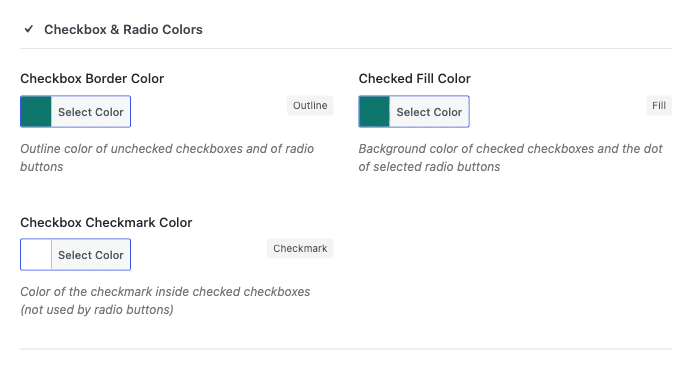
Each color only applies once you set it, so your existing forms look exactly the same until you decide to change them. Error highlighting and keyboard focus outlines still work as before. See the Form Style settings reference for every option.

Bring Back Coupons You Already Created in Stripe
Maybe you restored a backup, moved to a new host, or reinstalled the plugin. Your coupons are still sitting in Stripe, but they’ve vanished from your Coupons list, and trying to add them again just says the code already exists.
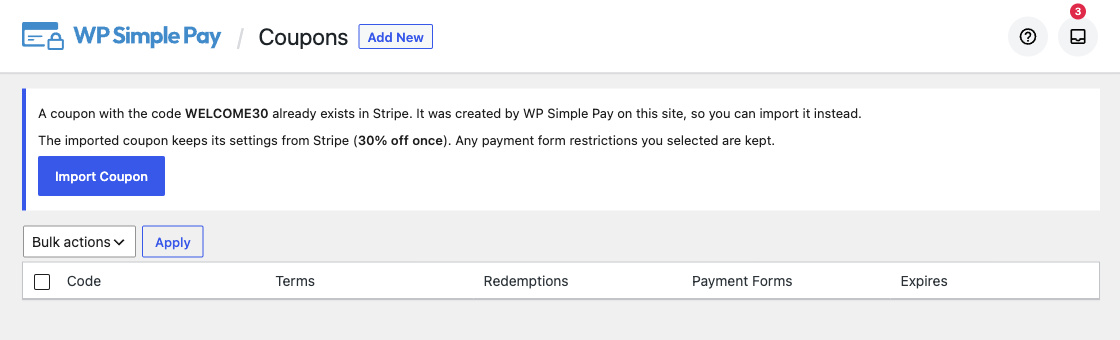
Now, when you add a coupon whose code already exists in Stripe and was created by your site, WP Simple Pay offers to import it. You’ll see the coupon’s terms (for example, “30% off once”) and an Import Coupon button. One click brings it back, along with any form restrictions you picked.
Coupon Codes That Work However Customers Type Them
A customer types SAVE10, but you created the coupon as save10. Before, that meant a “coupon not valid” message and, often, a support email. Coupon codes now match in any capitalization, so customers get their discount however they type it.
If you try to add a new coupon that only differs by capitalization from an existing one, you’ll see a friendly notice explaining why. Learn more in our coupons guide.
The Right Payment Methods for Every Order Size
Some buy now, pay later options only accept orders up to a certain amount. Before, a large order on a form with Afterpay/Clearpay turned on could stop every payment method from working, cards included.
Now, payment methods with amount limits only appear when the total is within their range, and the list updates as customers change the amount on custom amount forms. Your high-value forms keep taking card payments, and Afterpay/Clearpay shows up whenever the order qualifies. See the Afterpay/Clearpay guide for more.
Klarna also got a fix. When your form uses the Address field, Klarna no longer locks the billing country to the United States. Customers in any supported country can check out with their own address. More in the Klarna guide.
More Improvements in This Release
- Subscription renewals are recorded again on newer Stripe accounts, so every renewal shows up in your records.
- Cancellation emails arrive at the right time for subscriptions set to cancel at the end of the billing period.
- Address Type is explained when Afterpay/Clearpay is turned on, instead of silently switching back to Shipping.
- No more “Invalid URL” errors on on-site forms when no confirmation page is selected.
- Custom colors now save on the Payment Page and Confirmation Page settings.
- Placeholder text matches across card fields and other form fields.
- “Select all” works on the Payment Forms list.
- Smoother form builder, with conditional logic rules that stay visible on new fields and no false “Leave site?” prompts.
- File uploads are never missed, even when a file is picked before the form finishes loading.
- A truly clean uninstall when you choose not to keep your settings, while your customers’ uploaded files are kept safe.
- The About Us page no longer loads icons from an outside service.
For the full list of changes, see the changelog.
Update to WP Simple Pay 4.17.5 Today
This release is all about reliability: payment forms that work on fast, cached pages, coupons that just work, and checkboxes that finally match your brand.
Update from your WordPress dashboard under Plugins to get everything above. If you have any questions, our support team is happy to help.
We’d love to hear what you’d like to see next. Let us know in the comments or reach out anytime.
Prappo
Disclosure: Our content is reader-supported. This means if you click on some of our links, then we may earn a commission. We only recommend products that we believe will add value to our readers.

Leave a Reply