
How to Configure LiteSpeed Cache
Reading time: 2 minutes | Difficulty: Beginner
Overview
LiteSpeed Cache works with WP Simple Pay without special setup for your payment form pages. Since WP Simple Pay 4.17.5, payment forms load their data from your site as the page opens, so pages with payment forms can be cached. The only pages to exclude are your payment confirmation pages.
Prerequisites
- WP Simple Pay 4.17.5 or later. On earlier versions, exclude your payment form pages as well.
- The LiteSpeed Cache plugin installed and active
Cache Settings
Add the URIs of your payment success and failure pages to the Excludes tab in the LiteSpeed Cache settings.
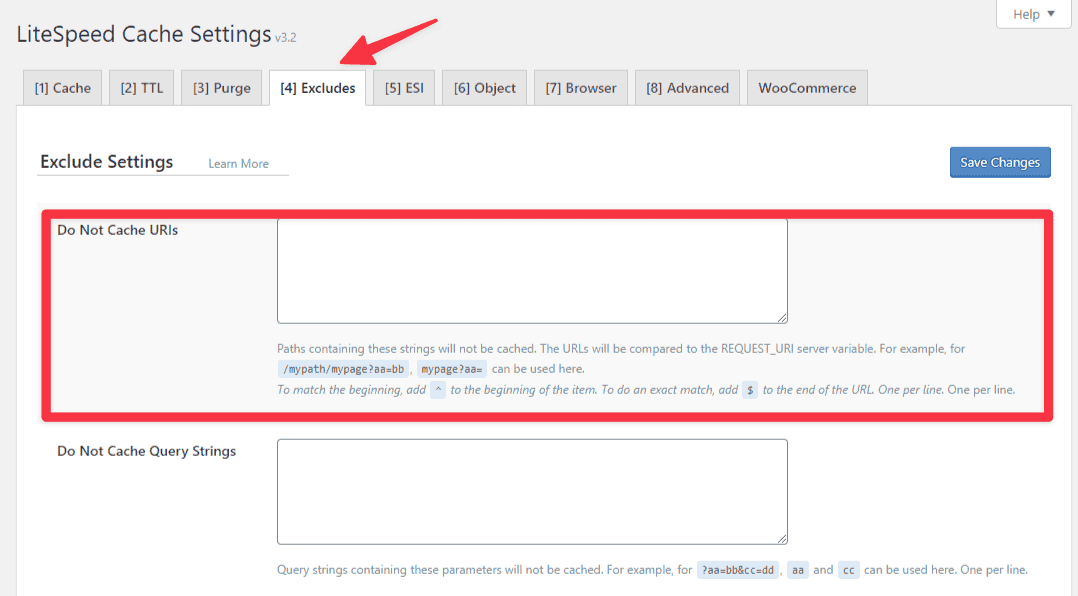
More information can be found in the LiteSpeed documentation.
Clear the Cache
After saving your changes, and after updating WP Simple Pay to 4.17.5, purge all LiteSpeed caches so every page is rebuilt with the current form code.
What’s Next?
- How to Resolve Issues Caused by Cache and Optimization Plugins – General caching and JavaScript optimization guidance
- How to Set Payment Success and Failure Pages – Find the pages to exclude
Still have questions? We're here to help!
Last Modified: