
How to Accept Zip Payments
In This Document
Reading time: 3 minutes | Difficulty: Beginner
Overview
Zip is a buy now, pay later (BNPL) service popular in Australia and the United States. Customers are redirected to Zip during checkout, approve the purchase, and repay Zip in installments — while you receive the full payment amount up front in your Stripe balance.
Offering an installment option like Zip can lift conversion on higher-priced products and services, since customers can spread the cost without a credit card.
| Payment Method Type | Buy now, pay later |
| Relevant Payer Geography | Australia, United States |
| Presentment Currency | AUD, USD |
| Recurring Payments | No |
| Refunds | Yes |
| Payment Completion | Immediate |
Prerequisites
- WP Simple Pay Professional or Elite license.
- A Stripe account that supports Zip. Zip is available to Stripe accounts in eligible regions — check the Stripe Zip documentation for the latest availability.
- A payment form using either the On-site or Off-site (Stripe Checkout) form type.
- A payment form configured for AUD (Australian Dollar) or USD (US Dollar). Zip is only offered for these currencies.
- A one-time payment amount within Zip’s transaction limits: 1.00–50,000.00 AUD or 35.00–1,500.00 USD. Zip is not offered for amounts outside these limits.
- A form that does not allow purchasing multiple prices at once. Zip is not offered on multiple line item forms.
Step 1: Enable Zip
To accept Zip payments, visit the Payment tab in the payment form builder and enable Zip.
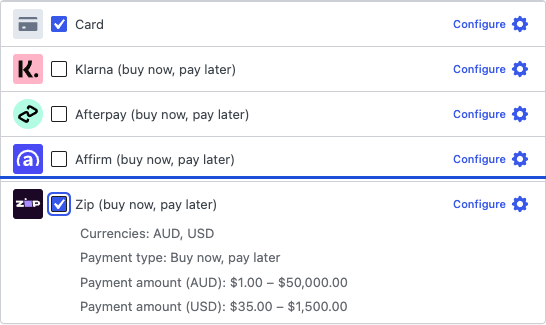
If Zip is not visible in the list, confirm:
- Your form’s currency is set to AUD or USD.
- Your Stripe account has Zip enabled. You can verify this in your Stripe Dashboard’s Payment methods settings.
Step 2: Customer Experience
When a customer selects Zip during checkout:
- WP Simple Pay creates a Zip payment request through Stripe (the on-site payment form or Stripe Checkout).
- The customer is redirected to Zip to sign in (or create an account) and approve the purchase.
- Zip approves the payment and the customer is redirected back to your confirmation page.
- You receive the full amount in your Stripe balance; the customer repays Zip in installments.
The installment schedule and approval flow are handled entirely by Zip — no extra configuration is needed on your form.
Frequently Asked Questions
Can I use Zip for subscriptions or recurring payments?
No. Zip is a one-time payment method only. For recurring billing, use credit cards or another recurring-capable payment method.
What happens if the customer is not approved by Zip?
If Zip declines the purchase, the payment fails and no funds move. The customer is returned to checkout and can choose a different payment method.
Are there fees beyond Stripe’s standard rate?
Buy now, pay later methods have their own Stripe fee schedule. Check Stripe’s pricing page for current Zip rates in your region.
Can I refund a Zip payment?
Yes. Zip refunds are processed through the standard Stripe Dashboard workflow.
What’s Next?
- Accepting Alma Payments — installment payments for European customers.
- Currency and Locale Settings — set your form’s currency to AUD or USD.
- Which Payment Methods Does WP Simple Pay Support?
Still have questions? We're here to help!
Last Modified: