
How to Accept Alma Payments
In This Document
Reading time: 3 minutes | Difficulty: Beginner
Overview
Alma is a buy now, pay later (BNPL) service widely used by French and Southern European merchants. Customers pay in 2, 3, or 4 installments while you receive the full payment amount up front in your Stripe balance.
Alma is especially popular in France, where installment payments are a common checkout expectation. Offering Alma can lift conversion on higher-priced products for customers in supported European countries.
| Payment Method Type | Buy now, pay later |
| Relevant Payer Geography | France, Belgium, Spain, Italy, Luxembourg, Netherlands |
| Presentment Currency | EUR |
| Recurring Payments | No |
| Refunds | Yes |
| Payment Completion | Immediate |
Prerequisites
- WP Simple Pay Professional or Elite license.
- A Stripe account that supports Alma. Alma is available to Stripe accounts in Belgium, Spain, France, Italy, Luxembourg, and the Netherlands — check the Stripe Alma documentation for the latest availability.
- A payment form using either the On-site or Off-site (Stripe Checkout) form type.
- A payment form configured for EUR (Euro). Alma is only offered when the form currency is EUR.
- A one-time payment amount within Alma’s transaction limits of 50.00–5,000.00 EUR. Alma is not offered for amounts outside these limits.
- A form that does not allow purchasing multiple prices at once. Alma is not offered on multiple line item forms.
Step 1: Enable Alma
To accept Alma payments, visit the Payment tab in the payment form builder and enable Alma.
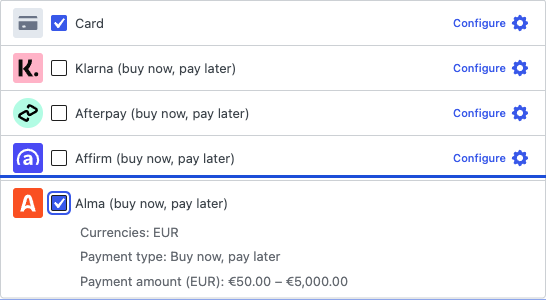
If Alma is not visible in the list, confirm:
- Your form’s currency is set to EUR on the General tab.
- Your Stripe account has Alma enabled. You can verify this in your Stripe Dashboard’s Payment methods settings.
Step 2: Customer Experience
When a customer selects Alma during checkout:
- WP Simple Pay creates an Alma payment request through Stripe (the on-site payment form or Stripe Checkout).
- The customer is redirected to Alma to choose an installment plan (2, 3, or 4 payments) and approve the purchase.
- Alma approves the payment and the customer is redirected back to your confirmation page.
- You receive the full amount in your Stripe balance; the customer repays Alma in installments.
The installment schedule and approval flow are handled entirely by Alma — no extra configuration is needed on your form.
Frequently Asked Questions
Can I use Alma for subscriptions or recurring payments?
No. Alma is a one-time payment method only. For recurring billing from European customers, use credit cards or SEPA Direct Debit.
What happens if the customer is not approved by Alma?
If Alma declines the purchase, the payment fails and no funds move. The customer is returned to checkout and can choose a different payment method.
Are there fees beyond Stripe’s standard rate?
Buy now, pay later methods have their own Stripe fee schedule. Check Stripe’s pricing page for current Alma rates in your region.
Can I refund an Alma payment?
Yes. Alma refunds are processed through the standard Stripe Dashboard workflow.
What’s Next?
- Accepting Zip Payments — buy now, pay later for Australian and US customers.
- Currency and Locale Settings — set your form’s currency to EUR.
- Which Payment Methods Does WP Simple Pay Support?
Still have questions? We're here to help!
Last Modified: