
Presentazione di WP Simple Pay 4.17.3: PIX, BLIK e altri modi per crescere a livello globale
Ultimo aggiornamento il

Se i tuoi moduli di pagamento accettano Real brasiliano o Złoty polacco, è molto probabile che tu abbia perso clienti silenziosamente al momento del checkout. Non per il prezzo o l'adeguatezza del prodotto, ma perché i tuoi clienti non vogliono pagare con carta. In Brasile, oltre la metà dei checkout online si conclude ora tramite PIX. In Polonia, circa quattro acquirenti online su cinque utilizzano BLIK prima di prendere il portafoglio.
Con WP Simple Pay 4.17.3, puoi offrire sia PIX che BLIK accanto ai tuoi metodi di pagamento esistenti con una singola casella di controllo ciascuno. Nessun nuovo account da fornire. Nessun nuovo campo da configurare. Il cliente scansiona un codice QR o digita un codice di sei cifre dall'app della propria banca e il pagamento arriva sul tuo saldo Stripe in pochi secondi.
Accetta PIX in Brasile
PIX è il sistema di pagamento interbancario istantaneo del Brasile, gestito dalla Banca Centrale del Brasile. I clienti pagano direttamente dall'app mobile della loro banca, i pagamenti vengono regolati in tempo reale e l'esperienza è così fluida che PIX ha rapidamente soppiantato le carte come metodo di pagamento online più diffuso nel paese.
Se accetti già BRL sul tuo account Stripe, abilitare PIX richiede un clic. Apri qualsiasi modulo di pagamento, vai alla scheda Pagamento e attiva PIX. Fatto. I tuoi clienti brasiliani vedranno un codice QR al checkout, lo scanneranno con la loro app bancaria e confermeranno il pagamento in meno di un minuto.
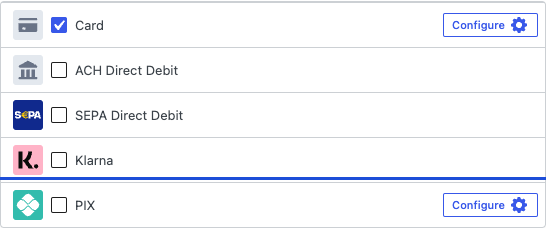
PIX è un metodo di pagamento monouso, quindi è più adatto a pagamenti una tantum piuttosto che ad abbonamenti. Per fatturazione ricorrente in Brasile, le carte di credito sono ancora la scelta giusta. Dettagli completi di configurazione e FAQ sono nella nostra documentazione PIX.
Accetta BLIK in Polonia
BLIK è l'equivalente metodo locale dominante in Polonia. Invece di un codice QR, i clienti generano un codice di sei cifre nella loro app bancaria mobile, lo digitano nel tuo checkout e approvano una notifica push dalla loro banca per confermare il pagamento. L'intero flusso richiede meno di un minuto e gli acquirenti polacchi lo conoscono bene.
Abilita BLIK nello stesso modo in cui abiliti PIX: apri un modulo prezzato in PLN, trova BLIK nell'elenco dei metodi nella scheda Pagamento e attivalo. I tuoi clienti polacchi non avranno più bisogno di passare attraverso carte o un metodo di reindirizzamento bancario più lento solo per darti i loro soldi.
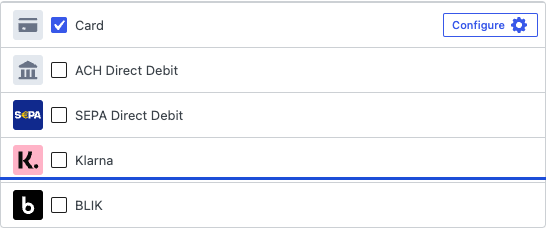
BLIK è solo una tantum. Per pagamenti ricorrenti in Polonia, abbina BLIK a carte di credito o Przelewy24 come metodi di fallback. La guida completa si trova nella documentazione BLIK.
Abbonamenti per clienti australiani
Se vendi a clienti australiani e hai mai configurato un modulo di abbonamento, probabilmente hai notato che BECS Direct Debit mancava dall'elenco dei metodi di pagamento non appena hai attivato la fatturazione ricorrente. L'Australia era l'eccezione: ACH (Stati Uniti), Bacs (Regno Unito) e SEPA (Unione Europea) supportavano tutti gli abbonamenti, ma BECS era bloccato come metodo monouso.
Questo è stato risolto nella versione 4.17.3. BECS Direct Debit ora supporta abbonamenti e pagamenti ricorrenti su qualsiasi modulo AU/AUD, portando l'Australia alla parità di funzionalità con gli altri principali mercati di addebito diretto bancario. I clienti completano l'autorizzazione del mandato al primo pagamento e gli addebiti successivi vengono eseguiti automaticamente secondo la pianificazione da te configurata.
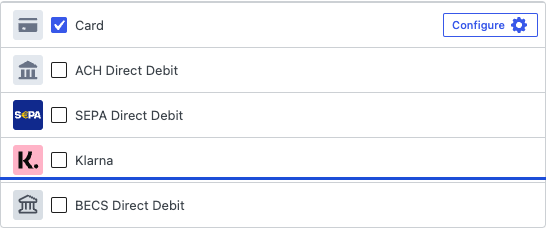
Poiché BECS è un metodo di notifica posticipata, il primo addebito e ogni rinnovo possono richiedere fino a tre giorni lavorativi per la conferma, esattamente come prima. Lo stato del rinnovo appare nella tua Stripe Dashboard e nel portale abbonamenti del cliente. I dettagli completi della configurazione sono nella documentazione BECS.
Nascondi Stripe Link sul checkout esterno
Il portafoglio Link di Stripe è ottimo per il riempimento automatico al primo inserimento della carta, ma alcuni venditori preferirebbero mantenere il loro Stripe Checkout esterno strettamente limitato a carte e banche. Forse Link compete con il linguaggio del tuo brand. Forse hai notato che i clienti completano il checkout tramite Link in un modo che aggira il tracciamento del tuo modulo. In ogni caso, ora puoi disattivarlo.
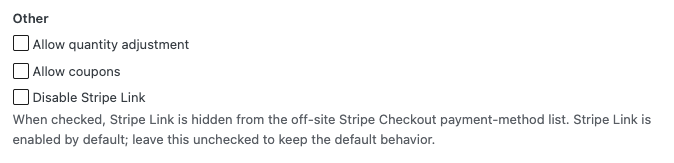
Su qualsiasi modulo Stripe Checkout esterno, vai alla scheda Stripe Checkout e seleziona "Disabilita Stripe Link". I clienti vedranno solo i metodi di pagamento che hai abilitato nella scheda Pagamento. L'impostazione è deselezionata per impostazione predefinita, quindi i moduli esistenti si comportano esattamente come prima, ma la scelta ora è tua. Riferimento impostazioni: Opzioni di visualizzazione di Stripe Checkout.
Gestisci abbonamenti senza Gutenberg
Il blocco Gestisci abbonamenti consente ai tuoi clienti di aggiornare il metodo di pagamento, modificare i dettagli di fatturazione o annullare un abbonamento senza contattare il supporto. Fino ad ora, era solo per Gutenberg.
La versione 4.17.3 aggiunge uno shortcode corrispondente, [simpay_manage_subscriptions], che funziona ovunque venga renderizzato uno shortcode: nell'Editor Classico, nei page builder che non elaborano blocchi Gutenberg, nelle parti di modello, nelle barre laterali o persino in un modello di landing page esistente. Stesso modulo, stesso flusso sicuro tramite link via email, stessa protezione antispam. Incolla semplicemente lo shortcode ovunque desideri che appaia il modulo.
Aggiornamenti di qualità della vita
- La duplicazione di un modulo non condivide più gli ID Stripe con l'originale. L'azione "Duplica" ora crea correttamente un nuovo set di prodotti e prezzi Stripe quando modifichi i prezzi della copia, quindi le modifiche alla copia non modificano silenziosamente l'originale.
- Il colore "Errore" dello stile del modulo ora si applica agli errori di convalida. Se hai personalizzato il colore di errore nella scheda Stile modulo e ti sei chiesto perché gli evidenziazioni dei campi obbligatori mostrassero ancora il rosso predefinito, questo è stato risolto.
- Lo scheduler in background è più pulito. Action Scheduler non crea più voci duplicate quando le richieste arrivano contemporaneamente. La maggior parte dei siti non noterà una differenza visibile, ma i siti più trafficati noteranno log più puliti.
Pronto per l'aggiornamento?
WP Simple Pay 4.17.3 è in fase di distribuzione. Dal tuo pannello di amministrazione di WordPress, vai su Plugin e fai clic su Aggiorna su WP Simple Pay Pro per ottenere i nuovi metodi di pagamento, lo sblocco degli abbonamenti australiani e il resto della versione nei tuoi moduli oggi stesso.
Se incontri qualcosa di inaspettato, il nostro team di supporto è qui per aiutarti. E se c'è un metodo di pagamento, un paese o una funzionalità che ti piacerebbe vedere in futuro, ci farebbe piacere saperlo. L'elenco completo delle modifiche è sulla pagina delle note di rilascio.
Divulgazione: I nostri contenuti sono supportati dai lettori. Ciò significa che se cliccate su alcuni dei nostri link, potremmo guadagnare una commissione. Raccomandiamo solo prodotti che crediamo aggiungeranno valore ai nostri lettori.
Lascia un commento