
Cómo personalizar los formatos de descripción de cuotas
En este documento
Tiempo de lectura: 3 minutos | Dificultad: Principiante
Resumen
Cuando creas un formulario de suscripción con un número limitado de pagos (cuotas), WP Simple Pay muestra una descripción del plan de pago a tus clientes. Por ejemplo, “12 pagos mensuales de 24 $”. Puedes elegir cómo se redactan estas descripciones seleccionando entre tres opciones de formato, tanto a nivel global como por formulario.
Prerrequisitos
- WP Simple Pay Pro (cualquier nivel)
- Un formulario de suscripción con un número máximo de ciclos de facturación configurado
Paso 1: Establecer un formato predeterminado global
La configuración global controla el formato predeterminado utilizado en todos tus formularios de pago.
- Navega a WP Simple Pay > Ajustes > General.
- Desplázate hacia abajo hasta la sección Moneda y formato.
- Busca el menú desplegable Formato de descripción de cuotas.
- Selecciona tu formato preferido entre las tres opciones disponibles.
- Haz clic en Guardar cambios.

Todos los formularios que no tengan una anulación por formulario utilizarán esta configuración global.
Paso 2: Anular el formato en un formulario específico (opcional)
Puedes anular el valor predeterminado global en cualquier formulario de pago individual.
- Navega a WP Simple Pay > Formularios de pago y edita el formulario que deseas personalizar.
- Haz clic en la pestaña Pago.
- Busca el menú desplegable Formato de descripción de cuotas.
- Elige un formato específico o selecciona Predeterminado global para usar la configuración global.
- Haga clic en Publicar o Actualizar para guardar el formulario.
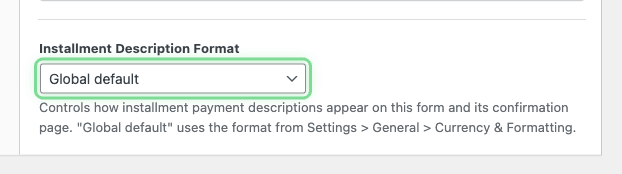
Opciones de formato disponibles
Cada formato ajusta automáticamente su redacción según si el intervalo de facturación es singular (por ejemplo, “cada mes”) o plural (por ejemplo, “cada 3 meses”).
Recuento + Adjetivo + Importe (Predeterminado)
Comienza con el número de pagos y utiliza un adjetivo para el intervalo.
- Mensual: “12 pagos mensuales de 24 $”
- Trimestral: “12 pagos de $24 cada 3 meses”
Importe por intervalo
Destaca el importe del pago y expresa el intervalo como una tarifa.
- Mensual: “$24 al mes durante 12 pagos”
- Trimestral: “$24 cada 3 meses durante 12 pagos”
Importe cada intervalo
Destaca el importe del pago y utiliza la expresión “cada”.
- Mensual: “$24 cada mes, 12 pagos en total”
- Trimestral: “$24 cada 3 meses, 12 pagos en total”
Preguntas frecuentes
¿Afecta esto a los formularios sin límites de plazos?
No. Esta configuración solo se aplica a los formularios de suscripción que tienen configurado un número máximo de ciclos de facturación. Las suscripciones abiertas no se ven afectadas.
¿Qué sucede si cambio el formato global después de crear formularios?
Cualquier formulario configurado como Predeterminado global utilizará inmediatamente el nuevo formato global. Los formularios con una anulación específica por formulario no se verán afectados.
¿Puedo traducir estas descripciones?
Sí. Todas las cadenas de formato son totalmente traducibles utilizando las herramientas de traducción estándar de WordPress. Cada formato tiene cadenas separadas para intervalos singulares y plurales.
¿Afecta esto a los formularios de Stripe Checkout (fuera del sitio)?
Esta configuración se aplica a los formularios de pago en el sitio (incrustados y superpuestos). Para los formularios de Stripe Checkout, la descripción se controla a través de la interfaz de Stripe.
¿Qué Sigue?
- Planes de pago – Aprende a configurar planes de pago a plazos
- Opciones de pago – Configura niveles de precios y ajustes de suscripción
¿Todavía tiene preguntas? ¡Estamos aquí para ayudarle!
Última modificación: