
BLIK決済の受け入れ方法
読むのにかかる時間: 3分 | 難易度: 初級
概要
BLIKは、顧客が銀行のモバイルアプリで生成された6桁のコードを使用して支払いを承認できるポーランドの決済システムです。ポーランドで最も利用されているオンライン決済方法であり、ポーランドのオンラインショッパーの約5分の4がカードや送金よりもBLIKを好んでいます。
支払いフォームにBLIKを追加すると、ポーランドの顧客の負担が軽減されます。カードの詳細や銀行ログインのリダイレクトは不要で、使い慣れたアプリから簡単なコード入力で済みます。
| 支払い方法の種類 | コードベースの承認 |
| 関連する支払い者の地理 | ポーランド |
| 提示通貨 | PLN |
| 国別利用可否 | ポーランド |
| 定期的な支払い | いいえ |
| 返金 | はい |
| 異議申し立て | いいえ |
| 支払い完了 | 即時 |
前提条件
- WP Simple Pay Plus、Professional、またはEliteライセンス。
- BLIKをサポートするStripeアカウント。BLIKは対象地域のStripeアカウントで利用可能です。最新の利用可能状況については、Stripe BLIKドキュメントを確認してください。
- PLN(ポーランドズロチ)用に設定された支払いフォーム。BLIKは、フォームの通貨がPLNの場合にのみ提供されます。
ステップ1:BLIKを有効にする
BLIK決済を受け入れるには、支払いフォームビルダーの支払いタブにアクセスし、BLIKを有効にします。
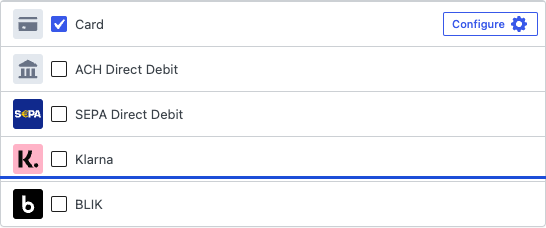
BLIKがリストに表示されない場合は、以下を確認してください:
- フォームの通貨が、一般タブでPLNに設定されていること。
- StripeアカウントでBLIKが有効になっていること。Stripeダッシュボードの支払い方法設定で確認できます。
ステップ 2: 顧客体験
顧客がチェックアウト時にBLIKを選択した場合:
- WP Simple PayはStripe経由でBLIK決済リクエストを作成します。
- Stripeは顧客にポーランドの銀行のモバイルアプリを開き、6桁のBLIKコードを生成するように促します。
- 顧客はチェックアウトページにコードを入力します。
- 銀行アプリは確認通知をプッシュします。顧客は60秒以内に承認します。
- 支払いは即座にキャプチャされ、顧客は確認ページにリダイレクトされます。
よくある質問
サブスクリプションまたは定期的な支払いにBLIKを使用できますか?
いいえ。BLIKは単回使用の1回限りの支払い方法です。ポーランドの顧客からの定期的な請求には、クレジットカードまたはPrzelewy24を使用してください。
顧客が時間内にコードを承認しなかった場合はどうなりますか?
BLIKコードは生成後2分間有効であり、銀行アプリの確認には約60秒のウィンドウがあります。顧客が時間内に承認しない場合、支払いは失敗し、資金は移動しません。顧客は新しいコードをリクエストして再試行できます。
Stripeの標準レートを超える手数料はありますか?
BLIKには独自のStripe手数料体系があります。現在のレートについては、ポーランドのStripe料金ページを確認してください。
BLIKの支払いを返金できますか?
はい。BLIKの返金は、標準のStripeダッシュボードワークフローを通じて処理されます。
次にやること
- Przelewy24決済の受け入れ — 2番目にポーランドの支払い方法で、BLIK対応銀行がない顧客に便利です。
- PIX決済の受け入れ — ブラジルのインスタント決済システム。
- 通貨と地域設定 — フォームの通貨をPLNに設定します。
- WP Simple Pay はどの支払い方法に対応していますか?
まだ質問がありますか?私たちが喜んでお手伝いします!
最終更新日: